

You know the pattern: back-to-back meetings, each bleeding into the next. By the time you leave, you're context-switching. Meanwhile, three action items are slipping away. You'll remember them or you won't, and someone asks what happened.
That's not a meeting problem. That's a friction problem.
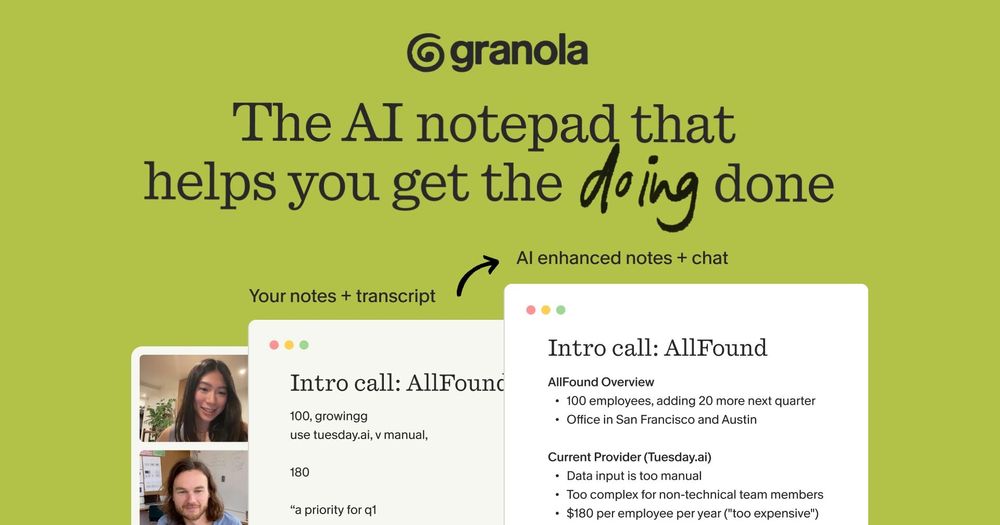
Most AI notetakers transcribe everything and send a summary. But transcripts aren't understandable. Summaries don't replace the work of turning conversations into progress. Granola is different: it's an AI notepad for engineering teams who live in meetings. It captures your perspective, enhances your notes, and lets you extract what matters—tickets, decisions, next steps without the post-meeting scramble.
The Meeting Reality for Engineering Teams
If you're an engineer, engineering manager, or tech lead, your calendar probably looks like:
- Standups running long on technical tangents
- Planning sessions where requirements never crystallize
- Architecture discussions with decisions immediately forgotten
- 1-on-1s where notes vanish in three weeks
- Customer calls where you're too busy taking notes to listen
The cognitive load is real. Traditional note-taking pulls your attention from the conversation. Even if you capture everything, you're left with raw material—transcripts or bullet points—that still require work to become actionable.
The deeper problem is post-meeting friction. Someone distills notes. Someone else figures out what was decided versus brainstorming. A third person realizes they committed to something they don't remember. Critical constraints get forgotten.
There's also context switching. Between meetings, you need time to process what you committed to, what changed, and what's blocking whom. But there's no time. There's just the next meeting. And the one after that.
Beyond Transcription: The Notepad Approach
Here's where most AI notetakers get stuck. They're transcription-first tools. They join the meeting, record everything, and send you a summary afterward. The value proposition is: "Never miss anything again."
But there's a catch:
- Transcripts without context aren't actionable. A 45-minute transcript tells you what was said, but not what matters. Did the team actually agree on that, or was it just brainstorming? You still need to read it, interpret it, and extract the signal.
- Distraction during the call. Many tools require a meeting bot to join. Everyone's asking about permissions. The tone shifts. Focus fractures.
- Post-meeting overhead. You still have to read through everything and extract what you need to do. Summaries aren't action lists. You need to rewrite them into a format your team uses.
Granola flips this approach. Instead of trying to capture everything perfectly, it assumes you already know what matters—you just need help organizing it and turning it into work.
Here's how it works:
- You start with a clean notepad. During the meeting, you jot down what matters to you—just like always. Quick bullets, no formal structure required.
- Granola transcribes in the background. Unlike traditional notetakers, Granola doesn't join the meeting as a bot. Instead, it transcribes from your device's audio directly—whether that's on macOS, Windows, or even iPhone for in-person conversations. No bot notifications. No distraction. You stay present.
- After the meeting, Granola enhances. Your notes + the transcript get combined and AI-enhanced into clear summaries, action items, and next steps—all from your point of view, not a sterile transcript.
- Then you chat with your notes. This is the powerful part. You can ask questions like "List my action items," "Draft a follow-up email," or "What were the open questions?" Granola extracts exactly what you need in seconds.
Since Granola uses your device audio instead of a meeting bot, no bot joins your call—and Granola doesn't store the audio recording itself. It stores the transcript and your notes, both encrypted in a US-hosted AWS environment. You maintain control; delete notes or request data deletion anytime.
| Aspect | Traditional AI Transcriber | Granola (AI Notepad) |
|---|---|---|
| Approach | Records everything, then summarizes | You note what matters; Granola enhances |
| Meeting bot | Joins the call (distraction) | No bot; uses device audio |
| Audio storage | Stores audio recordings | Stores transcript + notes only |
| Actionability | Generic summary; you extract value | Chat-based extraction; immediate results |
| Customize | Limited templates | Recipes for your workflow |
Engineering-Specific Superpowers
Now, here's where Granola moves from "nice tool" to "actually changes how we work." It has features built specifically for how engineering teams operate.
Extract action items and export to your tracker
Your standup: someone mentions an API change, a bug, or refactoring work. Normally, someone manually writes these in Linear or Jira—15-20 minutes of overhead.
With Granola, extract these as a structured list with context. Paste into your tracker or use Zapier to automate. You're in review-and-refine mode, not create-from-scratch. Across 10 standups weekly, that's two hours reclaimed.
Extract decisions from meeting context
Team discusses an API contract—versioning, error codes. Two weeks later, a developer implements it, and before submitting for review, they ask Granola Chat: "What was our API versioning decision in the API design meeting?" Granola pulls the specific discussion from your notes. They verify their implementation matches. It catches misalignment before code review becomes a 10-comment thread about whether versioning was right.
Searchable project folders
Decisions scatter: backward compatibility constraints, infrastructure tradeoffs, deprecation plans. Months later, a new engineer asks: "Why did we build it this way?" Search across meeting history in Granola. Find decisions, constraints, and reasoning. New engineers get context. Institutional knowledge is preserved and searchable.
Recipes (custom prompts)
Standups need action items. Architecture reviews need decision logs. Customer calls need follow-up drafts. Instead of asking Granola the same question each time, set up Recipes—reusable prompts saved for one-click retrieval.
A Standup Recipe extracts blockers and action items. An architecture review Recipe generates decision logs. A customer call Recipe drafts follow-ups with action items. You type / in chat, select the Recipe, and get instant results tailored to that meeting type.
Async collaboration
Share notes with your team. They read asynchronously. A teammate asks: "What does 'high-impact refactoring' mean?" without re-reading the full transcript. They chat with the notes, not the people. The notes answer.
Real-World Scenarios
Let's ground this in actual workflows:
Scenario 1: Product Strategy Meeting
Your PM gathers customer feedback and feature requests. Someone mentions a performance requirement. Another raises an integration constraint. Normally, nobody writes it up, or someone writes it wrong three days later. The roadmap ends up fuzzy.
With Granola: Your PM takes notes. After the call, ask Granola to extract prioritized items with reasoning. Granola pulls out "Feature X from customer Z: improves onboarding," "Constraint from customer A: must support existing API," "Performance requirement: sub-100ms." Structured and clear.
Paste into your roadmap. Later, when someone asks, "Why can't we do it this way?"—they chat with the notes: "Because customer A's integration requires this contract." No meeting needed. Reasoning is documented.
Scenario 2: Whiteboarding Session for API Design
Your team sketches endpoints. You discuss the versioning strategy. Someone raises backward compatibility concerns. You take notes on the endpoint structure, versioning decision, and constraints. Normally, this lives in a whiteboard photo. Two weeks later, during code review: "Wait, this doesn't handle versioning as we talked about." Now you have a discussion about whether to redo it.
With Granola: You have notes from the whiteboarding session. Before submitting code, a developer pastes it into Granola Chat: "Does this match what we planned?" Granola checks: Did they use header versioning as you agreed? Are they handling backward compatibility?
You catch a mismatch before it blocks. The code ships faster. The implementation matches the design because you verified it against the recorded decisions.
Scenario 3: Post-Standup Alignment
Your standup notes: bug in auth flow, notification refactor, and a customer pagination issue blocking a deal. Normally, someone writes tickets in Linear or Jira—context switch, manual work, and that critical customer issue gets deprioritized because it wasn't written clearly.
With Granola: Ask it to extract action items with context. It pulls: "Bug in auth flow: affects iOS login," "Notification refactoring: technical debt," "Pagination: blocking customer ABC, needs priority." The urgent issue stands out.
Paste into your tracker or use Zapier for automated sync. Full context is there. Urgent things get flagged. You're back to coding faster.
Scenario 4: 1-on-1s and Onboarding
Your manager has a 1-on-1 about a frustrating project. You discuss blockers, skills development, and support needs. Good conversation, but unclear next steps. The manager remembers something about system design help—immediate or next quarter?
A month later, misalignment. You expected course recommendations. They thought you'd bring it up again. Notes are lost in a notebook.
With Granola, the manager uses a Recipe for 1-on-1s that captures action items and growth decisions. After the call, Granola generates a summary: "Next steps: send system design course recommendations by Friday," "Professional growth: lead one architecture review this quarter," "Blocker: needs help with payment service."
It's documented, async, and clear. Three months later, a new hire reviews their manager's 1-on-1 notes to understand values and expectations. Onboarding is easier. Context is preserved.
Beyond Meetings: Making Meetings Matter
Here's the real win: meetings stop being a cost and start being an asset.
Normally, meetings leak value. You gather information, leave, and spend 30 minutes trying to remember what you agreed on. Action items disappear. Decisions get revisited because nobody documented them.
With Granola, that conversation becomes documented context. Future conversations reference it. New team members can search it. Decisions are retrieved, not reinvented. You spend less time re-explaining things and more time building them.
The math works: if you're in 10 meetings weekly with 20 minutes of post-meeting overhead each, you're spending 3+ hours a week managing meeting friction. Granola cuts that significantly. More importantly, your meetings lead somewhere. Commitments become tickets. Decisions are searchable forever. Your team stays aligned.
Getting Started
If you're thinking "this sounds useful, but what about privacy?"—valid concern. No bot joins your call. The app runs on your device, transcribes locally, and stores only the transcript and notes. You control everything.
To start:
- Download from granola.ai
- Connect your calendar (Google Calendar or Outlook)
- Grant microphone and system audio permissions
- Use in your next standup, planning session, or client call
- Take notes like you always do
- After the meeting, ask Granola to extract what you need
SitePoint readers get a free month with code SITEPOINT. Try it on your standups and whiteboarding sessions. See if your post-meeting overhead drops.
The best notetaker isn't one that captures everything perfectly. It's one that disappears into the background, keeps you focused, and then turns what you discussed into actual work.