I always like to think you can pick the web designer from print design backgrounds. They usually adore type — in fact, everything about it — and often still bear the scars of near madness brought on from being denied the control and subtlety they used to have in their print work.
There’s not too much doubt that getting the type right is one of the most fundamental elements of almost any design work, web or otherwise. It permeatates all levels of a site design from logo to footer and print designers generally have a better feel than most for the language of it’s ems, points, kernings, leading and whitespaces.
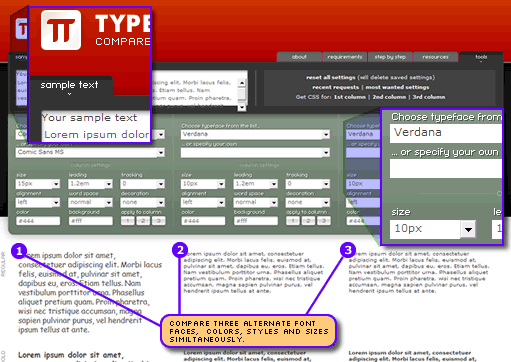
Enter a great little tool – Typetester. If you’re looking to develop more of a sense for the natural flow, proportion and balance of well-set type, TypeTester is a really nice way to play different text treatments off against each other.
It’s operation is fairly straight-forward.
- Use the provided ‘lorem’ text or, if you like, inject your own test copy.
- Select from a list of common system fonts (PC and Mac) or choose from ANY font on your home system — useful if you’re considering sIFRizing a font.
- Size it, color it, stretch it, compress it, underline it and generally mash up the place.
- View live variations on your settings further down the page in bold, italics, bold italics, uppercase, small caps and more.
- Transfer any combination that you like between columns, for even finer tuning of similar designs.
- When you’re happy, go to the ‘tools’ tabs at the top right and choose to download the CSS for any of the columns.
It’s a great idea that’s been really nicely implemented. We often collaborate with print-centric design companies that don’t have a deep appreciation for the difficulties and limitations of web type — this gives them a hands-on but relatively non-technical method of working with the type. Similarly, we can imagine sending fussy clients to Typetester to give us usable advice on how they would like their text to appear.
Hats off to Maratz.com.
 Alex Walker
Alex has been doing cruel and unusual things to CSS since 2001. He is the lead front-end design and dev for SitePoint and one-time SitePoint's Design and UX editor with over 150+ newsletter written. Co-author of The Principles of Beautiful Web Design. Now Alex is involved in the planning, development, production, and marketing of a huge range of printed and online products and references. He has designed over 60+ of SitePoint's book covers.