toad78
January 7, 2019, 8:52pm
1
Can anyone tell me why the background image in this code does not display?
The image exists.
I’m trying to remove the text (which I know to use font-size: 0!important; or change the text color—prefer not to use visibility: hidden;)
I have read that this SHOULD work on all browsers, but I’m not getting any output on any browser.
However, the alternative I would like to go with is to use FontAwesome, but I can’t even get those to post within <option> unless they are selected. I also need to preserve the “value” instead of actually changing it to the Font Awesome classification.
If you take a look at #two at the very last option, I would like to get the unicode to work so I can replace the “value” back to what it should be ('value=“bookmarks”).
Open to suggestions!
<!DOCTYPE html>
<html lang="en">
<head>
<meta charset="utf-8">
<title>title</title>
<link rel="stylesheet" href="https://use.fontawesome.com/releases/v5.6.3/css/all.css">
<style>
div#one select option {
background-repeat: no-repeat;
background-position: center center;
}
div#one #seltrans {
background-image: url("https://www.dgdtransport.com/wp-content/uploads/2019/01/transport-type.png");
}
div#one #localtrans {
background-image: url("https://www.dgdtransport.com/wp-content/uploads/2019/01/export.png");
}
div#one #nationtrans {
background-image: url("https://www.dgdtransport.com/wp-content/uploads/2019/01/export.png");
}
div#one #drayagetrans {
background-image: url("https://www.dgdtransport.com/wp-content/uploads/2019/01/drayage.png");
}
div#two select {
font-family: "Font Awesome 5 Free";
}
</style>
</head>
<body>
<div id="one">
<select name="input_6" id="input_26_6" class="small gfield_select form-control" tabindex="12" aria-required="true" aria-invalid="false">
<option value="" selected="selected" class="gf_placeholder" id="seltrans">
Select</option>
<option value="Local/Last Mile/LTL" id="localtrans">Local/Last Mile/LTL</option>
<option value="Nationwide Trucking" id="nationtrans">Nationwide Trucking</option>
<option value="Container Drayage" id="drayagetrans">Container Drayage</option>
</select>
</div>
<div id="two">
<select name="input_6" id="input_26_6" class="small gfield_select form-control" tabindex="12" aria-required="true" aria-invalid="false">
<option value="fas fa-building" selected="selected" class="gf_placeholder">
Select</option>
<option value="fas fa-address-card"></option>
<option value="fas fa-bell"></option>
<option value="fas fa-bookmark"></option>
</select>
</div>
</body>
</html>
toad78
January 7, 2019, 9:52pm
2
So I started working with using Font Awesome and was able to make an adjustment, but not all of the icons are displaying (using v. 5.6.3). The only one displaying is the “ ”. But even so, it doesn’t display unless it’s selected.
<style>
select {
font-family: "FontAwesome";
}
</style>
</head>
<body>
<div id="one">
<select name="input_6" id="input_26_6" class="small gfield_select form-control" tabindex="12" aria-required="true" aria-invalid="false">
<option value="" selected="selected" class="gf_placeholder" id="seltrans">
Select</option>
<option value="Local/Last Mile/LTL" id="localtrans"></option>
<option value="Nationwide Trucking" id="nationtrans"></option>
<option value="Container Drayage" id="drayagetrans"></option>
</select>
</div>
</body>
</html>
toad78
January 8, 2019, 3:51am
3
Still trying to get it to work, you can check the page here . You will see an quote form. The first field called “Transportation” is where I need to get the icons to show up.
Ray.H
January 8, 2019, 7:00am
4
Hi,<i class="fas"> when using the unicode.<i class="fas"></i>
I am also able to use standard unicode in your options and they work fine. Just seems to be having trouble with the fontawesome unicodes since you can’t nest tags in the option element .
Permitted content - Text, possibly with escaped characters (like é ).
<!DOCTYPE HTML>
<html lang="en">
<head>
<meta charset="utf-8">
<meta name="viewport" content="width=device-width, initial-scale=1.0">
<link rel="stylesheet" href="https://use.fontawesome.com/releases/v5.6.3/css/all.css" integrity="sha384-UHRtZLI+pbxtHCWp1t77Bi1L4ZtiqrqD80Kn4Z8NTSRyMA2Fd33n5dQ8lWUE00s/" crossorigin="anonymous">
<title>Test Page</title>
<style>
body {padding:20px}
select#input_26_6 {
font-family: Arial, FontAwesome;
margin:0 0 90px;
}
.fas {
display:block;
margin:2px 0;
}
</style>
</head>
<body>
<select name='input_6' id='input_26_6' class='small gfield_select' tabindex='12' aria-required="true" aria-invalid="false">
<option value='' selected='selected' class='gf_placeholder'>Select</option>
<option value='Local/Last Mile/LTL' > • Local/Last Mile/LTL</option>
<option value='Nationwide Trucking' > ► Nationwide Trucking</option>
<option value='Container Drayage' > ▼ Container Drayage</option>
</select>
<p>Using fontawesome <code>i class="fas fa-truck"</code> and raw unicode</p>
<p><i class="fas fa-truck"></i> </p>
<p><i class="fas fa-truck"></i> </p>
<p><i class="fas fa-th"></i> </p>
<p>Using fontawesome <code>i class="fas"</code> with nested unicode</p>
<i class="fas"></i>
<i class="fas"></i>
</body>
</html>
1 Like
toad78
January 8, 2019, 4:00pm
5
But I need to use the Font Awesome icons for the <option> elements. Supposedly it’s usable, but I can’t get them to display unless the user selects the option. It is at that point the icon displays.
PaulOB
January 8, 2019, 4:46pm
6
If you use a different version it all works.
<link href="https://maxcdn.bootstrapcdn.com/font-awesome/4.6.1/css/font-awesome.min.css" rel="stylesheet"/>
e.g.
<!DOCTYPE HTML>
<html lang="en">
<head>
<meta charset="utf-8">
<meta name="viewport" content="width=device-width, initial-scale=1.0">
<link href="https://maxcdn.bootstrapcdn.com/font-awesome/4.6.1/css/font-awesome.min.css" rel="stylesheet"/>
<title>Test Page</title>
<style>
body {
padding:20px
}
select#input_26_6 {
font-family: Arial, FontAwesome;
margin:0 0 90px;
}
.fas {
display:block;
margin:2px 0;
}
</style>
</head>
<body>
<select name='input_6' id='input_26_6' class='small gfield_select' tabindex='12' aria-required="true" aria-invalid="false">
<option value='' selected='selected' class='gf_placeholder'>Select</option>
<option value='Local/Last Mile/LTL' >  • Local/Last Mile/LTL</option>
<option value='Nationwide Trucking' > ► Nationwide Trucking</option>
<option value='Container Drayage' > ▼ Container Drayage</option>
</select>
</body>
</html>
toad78
January 8, 2019, 4:55pm
7
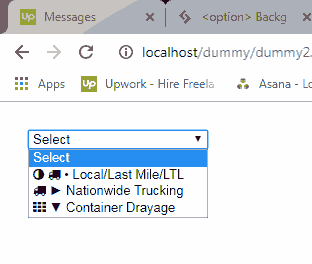
Doesn’t seem to be working in Firefox:
FIREFOX 64.0:
CHROME 71.0.3578.98 & IE 11.0.9600:
PaulOB
January 8, 2019, 5:07pm
8
No it doesn’t seem to work in Firefox. I’m not sure if that is a crossorigin policy either as the selected icon shows up as an icon in Firefox.
1 Like
Ray.H
January 8, 2019, 5:17pm
10
I was testing in Firefox, so that’s what I had based my conclusions on.
1 Like
PaulOB
January 8, 2019, 5:19pm
11
I believe there are issues in OS also so I think the only fullproof way to add icons is to use a select replacement technique (although its a lot of work).
IOS bug:
https://bugs.chromium.org/p/chromium/issues/detail?id=568116
toad78
January 8, 2019, 5:21pm
12
Yeah. I was hoping for something simple, knowing the limitation of the <option> tag.
Thanks for verifying, gents! It’ll just have to be unfriendly with Firefox.
1 Like
system
April 10, 2019, 12:39am
13
This topic was automatically closed 91 days after the last reply. New replies are no longer allowed.