On previous versions on the code I left the original file name. I changed it assumung that many users uoloading a file with the same name could cause a problem.
I know that the code can open the file but with a new name something doesn’t work.
What do I miss here?
The current working directory is the root of the website, not the directory where the PHP file being executed resides. So when you use a relative path you won’t find the file.
What you need to instead is use __DIR__, which contains the directory name the current file is in:
rpkamp, thanks for your answer, but nothing changed,
Here is the new code: $homepage = file_get_contents(__DIR__. "/uploads/".$user_id.$_SESSION['upload_time'].".html", 'r+') or die("Unable to open file!");
See how the formatting turns all pink? You have an syntax problem. I would suggest you not do all that escaping. It is error prone.
You shouldn’t be directly calling a file in the includes. That’s where include files should go.
Try this. Once it is working, get rid of the hard coded path. $homepage = file_get_contents("C:\wamp64\www\AHopefully\includes\uploads\$user_id{$_SESSION['upload_time']}.html", "r+") or die("Unable to open file!");
I tried. Nothing works. I get the same error message over and over again.
I my site users will upload a report, always names DetailedStatement.html.
Upon upload I want to give the file a unique name and than insert it to a variable as a string.
That code and the error are about different paths.
Can you post the full code you’re running please? The actual code would be best, instead of a screenshot.
Where are you getting the value for the session upload time? The filename you show in uploads is not the same as in the error message. As @rpkamp said, we need to see the full code at this point.
Your editor screen-shot suggests that you aren’t editing a .php file, you’re editing a .php.bak file. I don’t know EditPlus, maybe it means something else.
<?php
session_start();
//This page uploads the user's MT4 statement, Changes the file name to a distincrive user-related name, and moves it to uploads folder
if(isset($_SESSION['user_id']) && !empty($_SESSION['user_id'])){
//   Get user id to concatenate with detaoled statement to get user unique file name
$user_id = $_SESSION['user_id'];
$_SESSION['upload_time'] = date("Y-m-d-h-i-s");

// Check if submit button in upload file form was clicked
if(isset($_POST['submit'])){

  //  Get file data aray
  $file = $_FILES['fileToUpload'];


  $fileName = $_FILES['fileToUpload']['name'];
  $fileTmpName = $_FILES['fileToUpload']['tmp_name'];
  $fileSize = $_FILES['fileToUpload']['size'];
  $fileError = $_FILES['fileToUpload']['error'];
  $fileTYpe = $_FILES['fileToUpload']['type'];

//  Get uploaded file extention
  $fileExt = explode('.', $fileName);
  $fileActualExt = strtolower(end($fileExt));

// Create an array of allowed file extensions
  $allowed = array('htm', 'html');

//  Check if file is a correct file type
  if(in_array($fileActualExt, $allowed)){
//File extention O.K., CHock for upload errors
	if($fileError ===0){
//No upload errors, check file size
		if($fileSize < 300000){
// All O.K.
//Change file name to a distinct user related file name


        $fileNameNew = $user_id.$_SESSION['upload_time'].'.'.$fileActualExt;
//Move file to uploads folder
//var_dump($fileNameNew);
//die();
		 $fileDestination = "uploads/".$fileNameNew;

		 move_uploaded_file($fileTmpName, $fileDestination);
//Process statement data
		 header("Location: insert_data_to_db_balance_ver2.php");


		  }else {   //End filesize
		      $_SESSION['upload_error'] = "Upload error: file size too big";
		      header("Location: ../upload_statement.php"); // File is too big
			  exit();
		    }
	} else {        //End file error
	    $_SESSION['upload_error'] = "Upload error: upload process failure";
	         header("Location: ../upload_statement.php");
		     exit();
	  }

}else {				//End extension
	 $_SESSION['upload_error'] = "Upload error: wrong file type";
     header("Location: ../upload_statement.php");
	 exit();
  }

}// Endif(isset($_POST['submit'])

}else  //  End isset($_SESSION['user_id'])
	{
       header("Location: ../ooops.php");
	}
?>
And here is the relevant problematic code of the file insert_data_to_db_balance_ver2.php
 <?php
if(!isset($_SESSION['user_id'])){
  session_start();
}

$user_id = $_SESSION['user_id'];
//var_dump($user_id);
 //Insert statement into a string
 //require 'uploads/'.$user_id.$_SESSION['upload_time'].'.html';
 $path = __DIR__.$user_id.$_SESSION['upload_time'].".html";
file_get_contents($path, "r+") or die("Unable to open file!");
and here is a link to a typical statement being uploaded detailedstatement.html (23.9 KB)
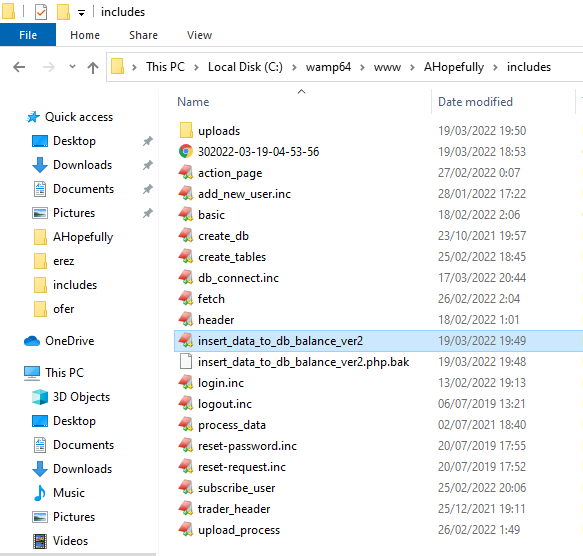
And here is a screenshot of the folder containing both quoted files and uploads folder
Just curious, why are you putting both the user id and the upload time together? Wouldn’t it make sense to generate a unique key and put it in a junction table with the user id? Then just use the unique key as the filename?
What happens if you change it so that they’re all the same? It’s only the slashes in your code that are the different way around, after all. Presumably it’s not going to make any difference, because in your earlier code you had them all the same way around, the switch from backslash to forward-slash around uploads is only in recent posts.
Use a globally unique identifier instead as already mentioned.
A GUID (globally unique identifier) is a 128-bit text string that represents an identification (ID) . Organizations generate GUIDs when a unique reference number is needed to identify information on a computer or network. A GUID can be used to ID hardware, software, accounts, documents and other items.