
JavaScript is an amazingly useful language that offers many unique benefits. With a little consideration for how scripted functionality degrades, you can use JavaScript to bring a whole range of functional, design and usability improvements to your web sites.
This article is actually an excerpt from SitePoint’s new title, The JavaScript Anthology: 101 Essential Tips, Tricks & Hacks. The four chapters included here cover:
- a comprehensive introduction to JavaScript including a tour of basic techniques, debugging, and more
- the ways in which the Document Object Model can be utilized in JavaScript programming
- the practicalities of working with frames, including techniques for working with popups, communicating between frames, and getting scrolling position
- an introduction to basic DHTML, which covers event handling, cursor detection, finding the size and position of an element, and more
If you’d rather read this primer offline, you can download the chapters in PDF format.
But now, let’s begin with an introduction to JavaScript, exploring what it’s for, and how we can use it.
JavaScript Defined
JavaScript is a scripting language that’s used to add interactivity and dynamic behaviors to web pages and applications. JavaScript can interact with other components of a web page, such as HTML and CSS, to make them change in real time, or respond to user events.
You’ll undoubtedly have seen JavaScript in the source code of web pages. It might have been inline code in an HTML element, like this:
<a href="page.html" onclick="open('page.html'); return false;">It might have appeared as a script element linking to another file:
<script type="text/javascript" src="myscript.js"></script>Or it may have had code directly inside it:
<script type="text/javascript">

function saySomething(message)

{

  alert(message);

}

saySomething('Hello world!');

</script>
Don’t worry about the differences between these snippets yet. There are quite a few ways — both good and bad — in which we can add JavaScript to a web page. We’ll look at these approaches in detail later in this chapter.
JavaScript was developed by Netscape and implemented in Netscape 2, although it was originally called LiveScript. The growing popularity of another language, Java, prompted Netscape to change the name in an attempt to cash in on the connection, as JavaScript provided the ability to communicate between the browser and a Java applet.
But as the language was developed both by Netscape, in its original form, and by Microsoft, in the similar-but-different JScript implementation, it became clear that web scripting was too important to be left to the wolves of vendor competition. So, in 1996, development was handed over to an international standards body called ECMA, and JavaScript became ECMAScript or ECMA-262.
Most people still refer to it as JavaScript, and this can be a cause of confusion: apart from the name and similarities in syntax, Java and JavaScript are nothing alike.
JavaScript’s Limitations
JavaScript is most commonly used as a client-side language, and in this case the “client” refers to the end-user’s web browser, in which JavaScript is interpreted and run. This distinguishes it from server-side languages like PHP and ASP, which run on the server and send static data to the client.
Since JavaScript does not have access to the server environment, there are many tasks that, while trivial when executed in PHP, simply cannot be achieved with JavaScript: reading and writing to a database, for example, or creating text files. But since JavaScript does have access to the client environment, it can make decisions based on data that server-side languages simply don’t have, such as the position of the mouse, or the rendered size of an element.
What About ActiveX?
If you’re already quite familiar with Microsoft’s JScript, you might be thinking “but JavaScript can do some of these things using ActiveX,” and that’s true — but ActiveX is not part of ECMAScript. ActiveX is a Windows-specific mechanism for allowing Internet Explorer to access COM (the Component Object Model at the heart of Windows scripting technology) and generally only runs in trusted environments, such as an intranet. There are some specific exceptions we’ll come across — examples of ActiveX controls that run without special security in IE (such as the Flash plugin, and XMLHttpRequest) — but for the most part, scripting using ActiveX is outside the scope of this book.
Usually, the computer on which a client is run will not be as powerful as a server, so JavaScript is not the best tool for doing large amounts of data processing. But the immediacy of data processing on the client makes this option attractive for small amounts of processing, as a response can be received straight away; form validation, for instance, makes a good candidate for client-side processing.
But to compare server-side and client-side languages with a view to which is “better” is misguided. Neither is better — they’re tools for different jobs, and the functional crossover between them is small. However, increased interactions between client-side and server-side scripting are giving rise to a new generation of web scripting, which uses technologies such as XMLHttpRequest to make requests for server data, run server-side scripts, and then manage the results on the client side. We’ll be looking into these technologies in depth in Chapter 18, Building Web Applications with JavaScript.
Security Restrictions
As JavaScript operates within the realm of highly sensitive data and programs, its capabilities have been restricted to ensure that it can’t be used maliciously. As such, there are many things that JavaScript simply is not allowed to do. For example, it cannot read most system settings from your computer, interact directly with your hardware, or cause programs to run.
Also, some specific interactions that would normally be allowed for a particular element are not permitted within JavaScript, because of that element’s properties. For example, changing the value of a form <input>
is usually no problem, but if it’s a file input field (e.g., <input type="file">), writing to it is not allowed at all — a restriction that prevents malicious scripts from making users upload a file they didn’t choose.
There are quite a few examples of similar security restrictions, which we’ll expand on as they arise in the applications we’ll cover in this book. But to summarize, here’s a list of JavaScript’s major limitations and security restrictions, including those we’ve already seen. JavaScript cannot:
- open and read files directly (except under specific circumstances, as detailed in Chapter 18, Building Web Applications with JavaScript).
- create or edit files on the user’s computer (except cookies, which are discussed in Chapter 8, Working with Cookies).
- read HTTP POST data.
- read system settings, or any other data from the user’s computer that is not made available through language or host objects (Host objects are things like
windowandscreen, which are provided by the environment rather than the language itself.) - modify the value of a file input field.
- alter a the display of a document that was loaded from a different domain.
- close or modify the toolbars and other elements of a window that was not opened by script (i.e., the main browser window).
Ultimately, JavaScript might not be supported at all.
It’s also worth bearing in mind that many browsers include options that allow greater precision than simply enabling or disabling JavaScript. For example, Opera includes options to disallow scripts from closing windows, moving windows, writing to the status bar, receiving right-clicks … the list goes on. There’s little you can do to work around this, but mostly, you won’t need to?such options have evolved to suppress “annoying” scripts (status bar scrollers, no-right-click scripts, etc.) so if you stay away from those kinds of scripts, the issue will come up only rarely.
JavaScript Best Practices
JavaScript best practices place a strong emphasis on the question of what you should do for people whose browsers don’t support scripting, who have scripting turned off, or who are unable to interact with the script for another reason (e.g., the user makes use of an assistive technology that does not support scripting).
That final issue is the most difficult to address, and we’ll be focusing on solutions to this problem in Chapter 16, JavaScript and Accessibility. In this section, I’d like to look at three core principles of good JavaScript:
- progressive enhancement – providing for users who don’t have JavaScript
- unobtrusive scripting – separating content from behavior
- consistent coding practice – using braces and semicolon terminators
The first principle ensures that we’re thinking about the bigger picture whenever we use a script on our site. The second point makes for easier maintenance on our end, and better usability and graceful degradation for the user. (Graceful degradation means that if JavaScript is not supported, the browser can naturally fall back on, or “degrade” to, non-scripted functionality.) The third principle makes code easier to read and maintain.
Providing for Users who Don’t Have JavaScript (Progressive Enhancement)
There are several reasons why users might not have JavaScript:
- They’re using a device that doesn’t support scripting at all, or supports it in a limited way.
- They’re behind a proxy server or firewall that filters out JavaScript.
- They have JavaScript switched off deliberately.
The first point covers a surprisingly large and ever-growing range of devices, including small-screen devices like PDAs, mid-screen devices including WebTV and the Sony PSP, as well as legacy JavaScript browsers such as Opera 5 and Netscape 4.
The last point in the list above is arguably the least likely (apart from other developers playing devil’s advocate!), but the reasons aren’t all that important: some users simply don’t have JavaScript, and we should accommodate them. There’s no way to quantify the numbers of users who fall into this category, because detecting JavaScript support from the server is notoriously unreliable, but the figures I’ve seen put the proportion of users who have JavaScript switched off between 5% and 20%, depending on whether you describe search engine robots as “users.”
Solution
The long-standing approach to this issue is to use the HTML noscript element, the contents of which are rendered by browsers that don’t support the script element at all, and browsers that support it but have scripting turned off.
Although it’s a sound idea, in practice this solution has become less useful over time, because noscript cannot differentiate by capability. A browser that offers limited JavaScript support is not going to be able to run a complicated script, but such devices are script-capable browsers, so they won’t parse the noscript element either. These browsers would end up with nothing.
A better approach to this issue is to begin with static HTML, then use scripting to modify or add dynamic behaviors within that static content.
Let’s look at a simple example. The preferred technique for making DHTML menus uses an unordered list as the main menu structure. We’ll be devoting the whole of Chapter 15, DHTML Menus and Navigation to this subject, but this short example illustrates the point:
<ul id="menu">

  <li><a href="/">Home</a></li>

  <li><a href="/about/">About</a></li>

  <li><a href="/contact/">Contact</a></li>

</ul>


<script type="text/javascript" src="menu.js"></script>
The list of links is plain HTML, so it exists for all users, whether or not they have scripting enabled. If scripting is supported, our menu.js script can apply dynamic behaviors, but if scripting isn’t supported, the content still appears. We haven’t differentiated between devices explicitly — we’ve just provided content that’s dynamic if the browser can handle it, and static if not.
Discussion
The “traditional” approach to this scenario would be to generate a separate, dynamic menu in pure JavaScript, and to have fallback static content inside a noscript element:
<script type="text/javascript" src="menu.js"></script>


<noscript>

  <ul>

    <li><a href="/">Home</a></li>

    <li><a href="/about/">About</a></li>

    <li><a href="/contact/">Contact</a></li>

  </ul>

</noscript>
But, as we’ve already seen, a wide range of devices will fall though this net, because JavaScript support is no longer an all-or-nothing proposition. The above approach provides default content to all devices, and applies scripted functionality only if it works.
This scripting approach is popularly referred to as progressive enhancement, and it’s a methodology we’ll be using throughout this book.
Don’t Ask!
Neither this technique nor the noscript element should be used to add a message that reads, “Please turn on JavaScript to continue.” At best, such a message is presumptuous (“Why should I?”); at worst it may be unhelpful (“I can’t!”) or meaningless (“What’s JavaScript?”). Just like those splash pages that say, “Please upgrade your browser,” these messages are as useful to the average web user as a road sign that reads, “Please use a different car.”
Occasionally, you may be faced with a situation in which equivalent functionality simply cannot be provided without JavaScript. In such cases, I think it’s okay to have a static message that informs the user of this incompatibility (in nontechnical terms, of course). But, for the most part, try to avoid providing this kind of message unless it’s literally the only way.
Separating Content from Behavior (Unobtrusive Scripting)
Separating content from behavior means keeping different aspects of a web page’s construction apart. Jeffrey Zeldman famously refers to this as the “three-legged stool” of web development (Zeldman, J. Designing with Web Standards. New Riders, 2003) — comprising content (HTML), presentation (CSS), and behavior (JavaScript) — which emphasizes not just the difference in each aspect’s functioning, but also the fact that they should be separated from one another.
Good separation makes for sites that are easier to maintain, are more accessible, and degrade well in older or lower-spec browsers.
Solution
At one extreme, which is directly opposed to the ideal of separating content from behavior, we can write inline code directly inside attribute event handlers. This is very messy, and generally should be avoided:
<div id="content"

    onmouseover="this.style.borderColor='red'"

    onmouseout="this.style.borderColor='black'">
We can improve the situation by taking the code that does the work and abstracting it into a function:
<div id="content"

    onmouseover="changeBorder('red')"

    onmouseout="changeBorder('black')">
Defining a function to do the work for us lets us provide most of our code in a separate JavaScript file:
Example 1.1. separate-content-behaviors.js (excerpt)


function changeBorder(element, to)

{

  element.style.borderColor = to;

}
But a much better approach is to avoid using inline event handlers completely. Instead, we can make use of the Document Object Model (DOM) to bind the event handlers to elements in the HTML document. The DOM is a standard programming interface by which languages like JavaScript can access the contents of HTML documents, removing the need for any JavaScript code to appear in the HTML document itself. In this example, our HTML code would look like the following:
<div id="content">Here’s the scripting we’d use:
Example 1.2. separate-content-behaviors.js


function changeBorder(element, to)

{

  element.style.borderColor = to;

}


var contentDiv = document.getElementById('content');


contentDiv.onmouseover = function()

{

  changeBorder('red');

};


contentDiv.onmouseout = function()

{

  changeBorder('black');

};
This approach allows us to add, remove, or change event handlers without having to edit the HTML, and since the document itself does not rely on or refer to the scripting at all, browsers that don’t understand JavaScript will not be affected by it. This solution also provides the benefits of reusability, because we can bind the same functions to other elements as needed, without having to edit the HTML.
This solution hinges on our ability to access elements through the DOM, which we’ll cover in depth in Chapter 5, Navigating the Document Object Model.
The Benefits of Separation
By practicing good separation of content and behavior, we gain not only a practical benefit in terms of smoother degradation, but also the advantage of thinking in terms of separation. Since we’ve separated the HTML and JavaScript, instead of combining them, when we look at the HTML we’re less likely to forget that its core function should be to describe the content of the page, independent of any scripting.
Andy Clarke refers to the web standards trifle, which is a useful analogy, A trifle looks the way a good web site should: when you look at the bowl, you can see all the separate layers that make up the dessert. The opposite of this might be a fruit cake: when you look at the cake, you can’t tell what each different ingredient is. All you can see is a mass of cake.
Discussion
It’s important to note that when you bind an event handler to an element like this, you can’t do it until the element actually exists. If you put the preceding script in the head section of a page as it is, it would report errors and fail to work, because the content div has not been rendered at the point at which the script is processed.
The most direct solution is to put the code inside a load event handler. It will always be safe there because the load event doesn’t fire until after the document has been fully rendered:
window.onload = function()

{

  var contentDiv = document.getElementById('content');


  ...

};
Or more clearly, with a bit more typing:
window.onload = init;


function init()

{

  var contentDiv = document.getElementById('content');


  ...

}
The problem with the load event handler is that only one script on a page can use it; if two or more scripts attempt to install load event handlers, each script will override the handler of the one that came before it. The solution to this problem is to respond to the load event in a more modern way; we’ll look at this shortly, in the section called “Getting Multiple Scripts to Work on the Same Page”.
Using Braces and Semicolons (Consistent Coding Practice)
In many JavaScript operations, braces and semicolons are optional, so is there any value to including them when they’re not essential?
Solution
Although braces and semicolons are often optional, you should always include them. This makes code easier to read — by others, and by yourself in future — and helps you avoid problems as you reuse and reorganize the code in your scripts (which will often render an optional semicolon essential).
For example, this code is perfectly valid:
Example 1.3. semicolons-braces.js (excerpt)


if (something) alert('something')

else alert('nothing')
This code is valid thanks to a process in the JavaScript interpreter called semicolon insertion. Whenever the interpreter finds two code fragments that are separated by one or more line breaks, and those fragments wouldn’t make sense if they were on a single line, the interpreter treats them as though a semicolon existed between them. By a similar mechanism, the braces that normally surround the code to be executed in if-else statements may be inferred from the syntax, even though they’re not present. Think of this process as the interpreter adding the missing code elements for you.
Even though these code elements are not always necessary, it’s easier to remember to use them when they are required, and easier to read the resulting code, if you do use them consistently.
Our example above would be better written like this:
Example 1.4. semicolons-braces.js (excerpt)


if (something) { alert('something'); }

else { alert('nothing'); }
This version represents the ultimate in code readability:
Example 1.5. semicolons-braces.js (excerpt)


if (something)

{

  alert('something');

}

else

{

  alert('nothing');

}
Using Function Literals
As you become experienced with the intricacies of the JavaScript language, it will become common for you to use function literals to create anonymous functions as needed, and assign them to JavaScript variables and object properties. In this context, the function definition should be followed by a semicolon, which terminates the variable assignment:
var saySomething = function(message)

{

  ...

};
Adding a Script to a Page
Before a script can begin doing exciting things, you have to load it into a web page. There are two techniques for doing this, one of which is distinctly better than the other.
Solution
The first and most direct technique is to write code directly inside a script element, as we’ve seen before:
<script type="text/javascript">

function saySomething(message)

{

  alert(message);

}


saySomething('Hello world!');

</script>
The problem with this method is that in legacy and text-only browsers — those that don’t support the script element at all — the contents may be rendered as literal text.
A better alternative, which avoids this problem, is always to put the script in an external JavaScript file. Here’s what that looks like:
<script type="text/javascript" src="what-is-javascript.js"

    ></script>
This loads an external JavaScript file named what-is-javascript.js. The file should contain the code that you would otherwise put inside the script element, like this:
Example 1.6. what-is-javascript.js


function saySomething(message)

{

  alert(message);

}


saySomething('Hello world!');
When you use this method, browsers that don’t understand the script element will ignore it and render no contents (since the element is empty), but browsers that do understand it will load and process the script. This helps to keep scripting and content separate, and is far more easily maintained — you can use the same script on multiple pages without having to maintain copies of the code in multiple documents.
Discussion
You may question the recommendation of not using code directly inside the script element. “No problem,” you might say. “I’ll just put HTML comments around it.” Well, I’d have to disagree with that: using HTML comments to “hide” code is a very bad habit that we should avoid falling into.
Putting HTML Comments Around Code
A validating parser is not required to read comments, much less to process them. The fact that commented JavaScript works at all is an anachronism — a throwback to an old, outdated practice that makes an assumption about the document that might not be true: it assumes that the page is served to a non-validating parser.
All the examples in this book are provided in HTML (as opposed to XHTML), so this assumption is reasonable, but if you’re working with XHTML (correctly served with a MIME type of application/xhtml+xml), the comments in your code may be discarded by a validating XML parser before the document is processed by the browser, in which case commented scripts will no longer work at all. For the sake of ensuring forwards compatibility (and the associated benefits to your own coding habits as much as to individual projects), I strongly recommend that you avoid putting comments around code in this way. Your JavaScript should always be housed in external JavaScript files.
The language Attribute
The language attribute is no longer necessary. In the days when Netscape 4 and its contemporaries were the dominant browsers, the <script> tag’s language attribute had the role of sniffing for up-level support (for example, by specifying javascript1.3), and impacted on small aspects of the way the script interpreter worked.
But specifying a version of JavaScript is pretty meaningless now that JavaScript is ECMAScript, and the language attribute has been deprecated in favor of the type attribute. This attribute specifies the MIME type of included files, such as scripts and style sheets, and is the only one you need to use:
<script type="text/javascript">Technically, the value should be text/ecmascript, but Internet Explorer doesn’t understand that. Personally, I’d be happier if it did, simply because javascript is (ironically) a word I have great difficulty typing — I’ve lost count of the number of times a script failure occurred because I’d typed type="text/javsacript".
Getting Multiple Scripts to Work on the Same Page
When multiple scripts don’t work together, it’s almost always because the scripts want to assign event handlers for the same event on a given element. Since each element can have only one handler for each event, the scripts override one another’s event handlers.
Solution
The usual suspect is the window object’s load event handler, because only one script on a page can use this event; if two or more scripts are using it, the last one will override those that came before it.
We could call multiple functions from inside a single load handler, like this:
window.onload = function()

{

  firstFunction();

  secondFunction();

}
But, if we used this code, we’d be tied to a single piece of code from which we’d have to do everything we needed to at load time. A better solution would provide a means of adding load event handlers that don’t conflict with other handlers.
When the following single function is called, it will allow us to assign any number of load event handlers, without any of them conflicting:
Example 1.7. add-load-listener.js


function addLoadListener(fn)

{

  if (typeof window.addEventListener != 'undefined')

  {

    window.addEventListener('load', fn, false);

  }

  else if (typeof document.addEventListener != 'undefined')

  {

    document.addEventListener('load', fn, false);

  else if (typeof window.attachEvent != 'undefined')

  {

    window.attachEvent('onload', fn);

  }

  else

  {

    var oldfn = window.onload;

    if (typeof window.onload != 'function')

    {

      window.onload = fn;

    }

    else

    {

      window.onload = function()

      {

        oldfn();

        fn();

      };

    }

  }

}
Once this function is in place, we can use it any number of times:
addLoadListener(firstFunction);

addLoadListener(secondFunction);

addLoadListener(twentyThirdFunction);
You get the idea!
Discussion
JavaScript includes methods for adding (and removing) event listeners, which operate much like event handlers, but allow multiple listeners to subscribe to a single event on an element. Unfortunately, the syntax for event listeners is completely different in Internet Explorer than it is in other browsers: where IE uses a proprietary method, others implement the W3C Standard. We’ll come across this dichotomy frequently, and we’ll discuss it in detail in Chapter 13, Basic Dynamic HTML.
The W3C standard method is called addEventListener:
window.addEventListener('load', firstFunction, false);The IE method is called attachEvent:
window.attachEvent('onload', firstFunction);As you can see, the standard construct takes the name of the event (without the “on” prefix), followed by the function that’s to be called when the event occurs, and an argument that controls event bubbling (see Chapter 13, Basic Dynamic HTML for more details on this). The IE method takes the event handler name (including the “on” prefix), followed by the name of the function.
To put these together, we need to add some tests to check for the existence of each method before we try to use it. We can do this using the JavaScript operator typeof, which identifies different types of data (as "string", "number", "boolean", "object", "array", "function", or "undefined"). A method that doesn’t exist will return "undefined".
if (typeof window.addEventListener != 'undefined')

{

  ... window.addEventListener is supported

}
There’s one additional complication: in Opera, the load event that can trigger multiple event listeners comes from the document object, not the window. But we can’t just use document because that doesn’t work in older Mozilla browsers (such as Netscape 6). To plot a route through these quirks we need to test for window.addEventListener, then document.addEventListener, then window.attachEvent, in that order.
Finally, for browsers that don’t support any of those methods (Mac IE 5, in practice), the fallback solution is to chain multiple old-style event handlers together so they’ll get called in turn when the event occurs. We do this by dynamically constructing a new event handler that calls any existing handler before it calls the newly-assigned handler when the event occurs. (This technique was pioneered by Simon Willison.)
Example 1.8. add-load-listener.js (excerpt)


var oldfn = window.onload;

if (typeof window.onload != 'function')

{

  window.onload = fn;

}

else

{

  window.onload = function()

  {

    oldfn();

    fn();

  };

}
Don’t worry if you don’t understand the specifics of how this works — we’ll explore the techniques involved in much greater detail in Chapter 13, Basic Dynamic HTML. There, we’ll learn that event listeners are useful not just for the load event, but for any kind of event-driven script.
Hiding JavaScript Source Code
If you’ve ever created something that you’re proud of, you’ll understand the desire to protect your intellectual property. But JavaScript on the Web is an open-source language by nature; it comes to the browser in its source form, so if the browser can run it, a person can read it.
There are a few applications on the Web that claim to offer source-code encryption, but in reality, there’s nothing you can do to encrypt source-code that another coder couldn’t decrypt in seconds. In fact, some of these programs actually cause problems: they often reformat code in such a way as to make it slower, less efficient, or just plain broken. My advice? Stay away from them like the plague.
But still, the desire to hide code remains. There is something that you can do to obfuscate, if not outright encrypt, the code that your users can see.
Solution
Code that has been stripped of all comments and unnecessary whitespace is very difficult to read, and as you might expect, extracting individual bits of functionality from such code is extremely difficult. The simple technique of compressing your scripts in this way can put-off all but the most determined hacker. For example, take this code:
Example 1.9. obfuscate-code.js (excerpt)


var oldfn = window.onload;

if (typeof window.onload != 'function')

{

  window.onload = fn;

}

else

{

  window.onload = function()

  {

    oldfn();

    fn();

  };

}
We can compress that code into the following two lines simply by removing unnecessary whitespace:
Example 1.10. obfuscate-code.js (excerpt)


var oldfn=window.onload;if(typeof window.onload!='function'){

window.onload=fn;}else{window.onload=function(){oldfn();fn();};}
However, remember that important word — unnecessary. Some whitespace is essential, such as the single spaces after var and typeof.
Discussion
This practice has advantages quite apart from the benefits of obfuscation. Scripts that are stripped of comments and unnecessary whitespace are smaller; therefore, they’re faster loading, and may process more quickly.
But please do remember that the code must remain strictly formatted using semicolon line terminators and braces (as we discussed in the section called “Using Braces and Semicolons (Consistent Coding Practice)”); otherwise, the removal of line breaks will make lines of code run together, and ultimately cause errors.
Before you start compression, remember to make a copy of the script. I know it seems obvious, but I’ve made this mistake plenty of times, and it’s all the more galling for being so elementary! What I do these days is write and maintain scripts in their fully spaced and commented form, then run them through a bunch of search/replace expressions just before they’re published. Usually, I keep two copies of a script, named myscript.js and myscript-commented.js, or something similar.
We’ll come back to this subject in Chapter 20, Keeping up the Pace, where we’ll discuss this among a range of techniques for improving the speed and efficiency of scripts, as well as reducing the amount of physical space they require.
Debugging a Script
Debugging is the process of finding and (hopefully) fixing bugs. Most browsers have some kind of bug reporting built in, and a couple of external debuggers are also worth investigating.
Understanding a Browser’s Built-in Error Reporting
Opera, Mozilla browsers (such as Firefox), and Internet Explorer all have decent bug reporting functionality built in, but Opera and Mozilla’s debugging tools are the most useful.
Opera
Open the JavaScript console from Tools > Advanced > JavaScript console. You can also set it to open automatically when an error occurs by going to Tools > Preferences > Advanced > Content, then clicking the JavaScript options button to open its dialog, and checking Open JavaScript console on error.
Firefox and other Mozilla browsers
Open the JavaScript console from Tools > JavaScript console.
Internet Explorer for Windows
Go to Tools > Internet Options > Advanced and uncheck the option Disable script debugging, then check the option Display a notification about every script error, to make a dialog pop up whenever an error occurs.
Internet Explorer for Mac
Go to Explorer > Preferences > Web Browser > Web Content and check the Show scripting error alerts option.
Safari doesn’t include bug reporting by default, but recent versions have a “secret” Debug menu, including a JavaScript console, which you can enable by entering the following Terminal command. (The $ represents the command prompt, and is not to be typed.)
$ defaults write com.apple.safari IncludeDebugMenu -bool trueYou can also use an extension called Safari Enhancer, which includes an option to dump JavaScript messages to the Mac OS Console; however, these messages are not very helpful.
Understanding the various browsers’ console messages can take a little practice, because each browser gives such different information. Here’s an example of an error — a mistyped function call:
function saySomething(message)

{

  ...

  alert(message);

}

saySometing('Hello world');
Firefox gives a concise but very accurate report, which includes the line number at which the error occurred, and a description, as shown in Figure 1.1, “The JavaScript errors console in Firefox”.
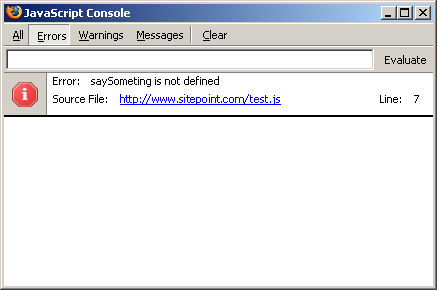
Figure 1.1. The JavaScript errors console in Firefox
As Figure 1.2, “The JavaScript console in Opera” illustrates, Opera gives an extremely verbose report, including a backtrace to the event from which the error originated, a notification of the line where it occurred, and a description.
A backtrace helps when an error occurs in code that was originally called by other code; for example, where an event-handler calls a function that goes on to call a second function, and it’s at this point that the error occurs. Opera’s console will trace this process back through each stage to its originating event or call.
Internet Explorer gives the fairly basic kind of report shown in Figure 1.3, “The JavaScript console in Windows IE”. It provides the number of the line at which the interpreter encountered the error (this may or may not be close to the true location of the actual problem), plus a summary of the error type, though it doesn’t explain the specifics of the error itself. (Internet Explorer is particularly bad at locating errors in external JavaScript files. Often, the line number it will report as the error location will actually be the number of the line at which the script is loaded in the HTML file.)
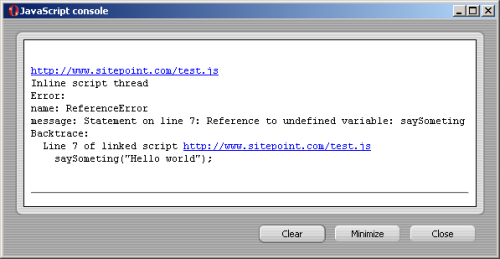
Figure 1.2. The JavaScript console in Opera

Figure 1.3. The JavaScript console in Windows IE
As you probably gathered, I’m not overly impressed by Internet Explorer’s error reporting, but it is vastly better than nothing: at least you know that an error has occurred.
Using alert
The alert function is a very useful means of analyzing errors — you can use it at any point in a script to probe objects and variables to see if they contain the data you expect. For example, if you have a function that has several conditional branches, you can add an alert within each condition to find out which is being executed:
Example 1.11. debugging-dialogs.js


function checkAge(years)

{

  if (years < 13)

  {

    alert('less than 13');


    ... other scripting

  }

  else if (years >= 13 && years <= 21)

  {

    alert('13 to 21');


    ... other scripting

  }

  else

  {

    alert('older');


    ... other scripting

  }

}
Maybe the value for years is not coming back as a number, like it should. You could add to the start of your script an alert that tests the variable to see what type it is:
function checkAge(years)

{

  alert(typeof years);

  ...
In theory, you can put any amount of information in an alert dialog, although a very long string of data could create such a wide dialog that some of the information would be clipped or outside the window. You can avoid this by formatting the output with escape characters, such as n for a line break.
Using try-catch
The try-catch construct is an incredibly useful way to get a script just to “try something,” leaving you to handle any errors that may result. The basic construct looks like this:
Example 1.12. debugging-trycatch.js (excerpt)


try

{

  ... some code

}

catch (err)

{

  ... this gets run if the try{} block results in an error

}
If you’re not sure where an error’s coming from, you can wrap a try-catch around a very large block of code to trap the general failure, then tighten it around progressively smaller chunks of code within that block. For example, you could wrap a try brace around the first half of a function (at a convenient point in the code), then around the second half, to see where the error occurs; you could then divide the suspect half again, at a convenient point, and keep going until you’ve isolated the problematic line.
catchhas a single argument (I've called iterrin this case), which receives the error object; we can query properties of that object, such as name and message, to get details about the error.
Often, I use a for-in iterator to run through the entire object and find out what it says:
Example 1.13. debugging-trycatch.js (excerpt)


for (var i in err)

{

  alert(i + ': ' + err[i]);

}
Writing to the Page or Window
If you’re examining a great deal of data while debugging, or you’re dealing with data that’s formatted in a complicated way, it’s often better to write that data directly to a page or popup window than to try to deal with lots of alert dialogs. If you’re examining data in a loop, in particular, you could end up generating hundreds of dialogs, each of which you’ll have to dismiss manually?a very tedious process.
In these kinds of situations, we can use an element’s innerHTML property to write the data to the page. Here’s an example in which we build a list using the contents of an array (data), then write it into a test div:
Example 1.14. debugging-writing.js (excerpt)


var test = document.getElementById('testdiv');


test.innerHTML += '<ul>';

for (var i = 0; i < data.length; i++)

{

  test.innerHTML += '<li>' + i + '=' + data[i] + '</li>';

}

test.innerHTML += '</ul>';
We can also write the data into a popup, which is useful if there’s no convenient place to put it on the page:
Example 1.15. debugging-writing.js (excerpt)


var win = window.open('', win, 'width=320,height=240');


win.document.open();

win.document.write('<ul>');

for (var i = 0; i < data.length; i++)

{

  win.document.write('<li>' + i + '=' + data[i] + '</li>')

}

win.document.write('</ul>');

win.document.close();
You can format the output however you like, and use it to structure data in any way that makes it easier for you to find the error.
When you’re working with smaller amounts of data, you can gain a similar advantage by writing the data to the main title element:
Example 1.16. debugging-writing.js (excerpt)


document.title = '0 = ' + data[0];
This final approach is most useful when tracking data that changes continually or rapidly, such as a value being processed by a setInterval function (an asynchronous timer we’ll meet properly in Chapter 14, Time and Motion).
Using an External Debugger
I can recommend two debuggers:
- Venkman for Mozilla and Firefox
- Microsoft Script Debugger for Windows Internet Explorer
External debuggers are a far more detailed way to analyze your scripts, and have much greater capabilities than their in-browser counterparts. External debuggers can do things like stopping the execution of the script at specific points, or watching particular properties so that you’re informed of any change to them, however it may be caused. They also include features that allow you “step through” code line by line, in order help find errors that may occur only briefly, or are otherwise difficult to isolate.
External debuggers are complex pieces of software, and it can take time for developers to learn how to use them properly. They can be very useful for highlighting logical errors, and valuable as learning tools in their own right, but they’re limited in their ability to help with browser incompatibilities: they’re only useful there if the bug you’re looking for is in the browser that the debugger supports!
Strict Warnings
If you open the JavaScript console in Firefox you’ll see that it includes options to show Errors and Warnings. Warnings notify you of code that, though it is not erroneous per se, does rely on automatic error handling, uses deprecated syntax, or is in some other way untrue to the ECMAScript specification. (To see these warnings, it may be necessary to enable strict reporting by typing in the address about:config and setting javascript.options.strict to true.)
For example, the variable fruit is defined twice in the code below:
Example 1.17. strict-warnings.js (excerpt)


var fruit = 'mango';


if (basket.indexOf('apple') != -1)

{

  var fruit = 'apple';

}
We should have omitted the second var, because var is used to declare a variable for the first time, which we’ve already done. Figure 1.4, “The JavaScript warnings console in Firefox” shows how the JavaScript console will highlight our error as a warning.
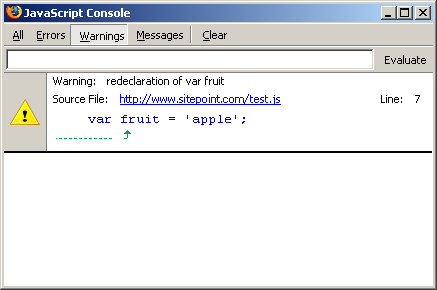
Figure 1.4. The JavaScript warnings console in Firefox
There are several coding missteps that can cause warnings like this. For example:
- re-declaring a variable – This produces the warning, “redeclaration of var name,” as we just saw.
- failing to declare a variable in the first place – This oversight produces the warning, “assignment to undeclared variable name.” This might arise, for example, if the first line of our code read
simply fruit = 'mango'; - assuming the existence of an object – This assumption produces the warning “reference to undefined property name.”
For example, a test condition like if (document.getElementById) assumes the existence of the getElementById method, and banks on the fact that JavaScript’s automatic error-handling capabilities will convert a nonexistent method to false in browsers in which this method doesn’t exist. To achieve the same end without seeing a warning, we would be more specific, using if(typeof document.getElementById != 'undefined').
There are also some function-related warnings, and a range of other miscellaneous warnings that includes my personal favorite, “useless expression,” which is produced by a statement within a function that does nothing:
Example 1.18. strict-warnings.js (excerpt)


function getBasket()

{

  var fruit = 'pomegranate';

  fruit;

}
For a thorough rundown on the topic, I recommend Alex Vincent’s article Tackling JavaScript strict warnings.
Warnings don’t matter in the sense that they don’t prevent our scripts from working, but working to avoid warnings helps us to adopt better coding practice, which ultimately creates efficiency benefits. For instance, scripts run faster in Mozilla if there are no strict warnings, a subject we’ll look at again in Chapter 20, Keeping up the Pace.
Type Conversion Testing
Although we shouldn’t rely on type conversion to test a value that might be undefined, it’s perfectly fine to do so for a value that might be null, because the ECMAScript specification requires that null evaluates to false. So, for example, having already established the existence of getElementById using the typeof operator as shown above, it’s perfectly safe from then on to test for individual elements as shown below, because getElementById returns null for nonexistent elements in the DOM:
if (document.getElementById('something'))

{

  ... the element exists

}
Summary
In this chapter, we’ve talked about best-practice approaches to scripting that will make our code easier to read and manage, and will allow it to degrade gracefully in unsupported devices. We’ve also begun to introduce some of the techniques we’ll need to build useful scripts, including the ubiquitous load event listener that we’ll use for almost every solution in this book!
We’ve covered some pretty advanced stuff already, so don’t worry if some of it was difficult to take in. We’ll be coming back to all the concepts and techniques we’ve introduced here as we progress through the remaining chapters.
Chapter 5. Navigating the Document Object Model
Browsers give JavaScript programs access to the elements on a web page via the Document Object Model (DOM) — an internal representation of the headings, paragraphs, lists, styles, IDs, classes, and all the other data to be found in the HTML on your page.
The DOM can be thought of as a tree consisting of interconnected nodes. Each tag in an HTML document is represented by a node; any tags that are nested inside that tag are nodes that are connected to it as children, or branches in the tree. Each of these nodes is called an element node. (Strictly speaking, each element node represents a pair of tags – the start and end tags of an element (e.g., <p> and </p>) – or a single self-closing tag (e.g., <br>, or <br/> in XHTML).) There are several other types of nodes; the most useful are the document node, text node, and attribute node. The document node represents the document itself, and is the root of the DOM tree. Text nodes represent the text contained between an element’s tags. Attribute nodes represent the attributes specified inside an element’s opening tag. Consider this basic HTML page structure:
<html>

  <head>

    <title>Stairway to the stars</title>

  </head>

  <body>

    <h1 id="top">Stairway to the stars</h1>

    <p class="introduction">For centuries, the stars have been

      more to humankind than just burning balls of gas ...</p>

  </body>

</html>
The DOM for this page could be visualized as Figure 5.1, “The DOM structure of a simple HTML page, visualized as a tree hierarchy”.
Every page has a document node, but its descendents are derived from the content of the document itself. Through the use of element nodes, text nodes, and attribute nodes, every piece of information on a page is accessible via JavaScript.
The DOM isn’t just restricted to HTML and JavaScript, though. Here’s how the W3C DOM specification site explains the matter:
The Document Object Model is a platform- and language-neutral interface that will allow programs and scripts to dynamically access and update the content, structure and style of documents.
So, even though the mixture of JavaScript and HTML is the most common combination of technologies in which the DOM is utilized, the knowledge you gain from this chapter can be applied to a number of different programming languages and document types.
In order to make you a “master of your DOMain,” this chapter will explain how to find any element you’re looking for on a web page, then change it, rearrange it, or erase it completely.
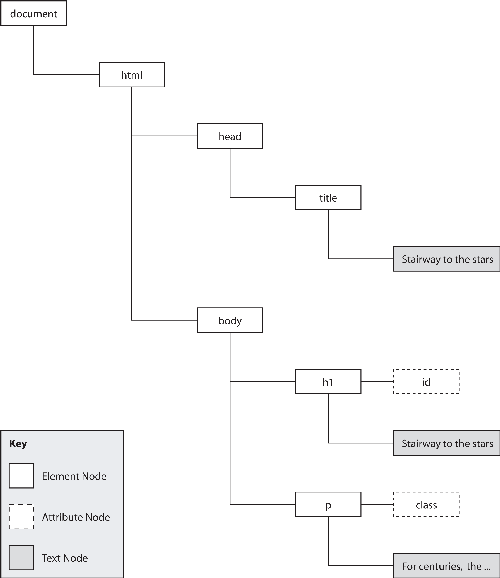
Figure 5.1. The DOM structure of a simple HTML page, visualized as a tree hierarchy
Accessing Elements
Access provides control, control is power, and you’re a power programmer, right? So you need access to everything that’s on a web page. Fortunately, JavaScript gives you access to any element on a page using just a few methods and properties.
Solution
Although it’s possible to navigate an HTML document like a road map?starting from home and working your way towards your destination one node at a time?this is usually an inefficient way of finding an element because it requires a lot of code, and any changes in the structure of the document will usually mean that you have to rewrite your scripts. If you want to find something quickly and easily, the method that you should tattoo onto the back of your hand is document.getElementById.
Assuming that you have the correct markup in place, getElementById will allow you immediately to access any element by its unique id attribute value. For instance, imagine your web page contains this code:
Example 5.1. access_element.html (excerpt)


<p>

  <a id="sirius" href="sirius.html">Journey to the stars</a>

</p>
You can use the a element’s id attribute to get direct access to the element itself:
Example 5.2. access_element.js (excerpt)


var elementRef = document.getElementById("sirius");
The value of the variable elementRef will now be referenced to the a element — any operations that you perform on elementRef will affect that exact hyperlink.
getElementByIdis good for working with a specific element; however, sometimes you'll want to work with a group of elements. In order to retrieve a group of elements on the basis of their tag names, you can use the methodgetElementsByTagName.
As can be seen from its name, getElementsByTagName takes a tag name and returns all elements of that type. Assume that we have this HTML code:
Example 5.3. access_element2.html (excerpt)


<ul>

  <li>

    <a href="sirius.html">Sirius</a>

  </li>

  <li>

    <a href="canopus.html">Canopus</a>

  </li>

  <li>

    <a href="arcturus.html">Arcturus</a>

  </li>

  <li>

    <a href="vega.html">Vega</a>

  </li>

</ul>
We can retrieve a collection that contains each of the hyperlinks like so:
Example 5.4. access_element2.js (excerpt)


var anchors = document.getElementsByTagName("a");
The value of the variable anchors will now be a collection of a elements. Collections are similar to arrays in that each of the items in a collection is referenced using square bracket notation, and the items are indexed numerically starting at zero. The collection returned by getElementsByTagName sorts the elements by their source order, so we can reference each of the links thus:
anchorArray[0]


    the a element for "Sirius"

anchorArray[1]


    the a element for "Canopus"

anchorArray[2]


    the a element for "Arcturus"

anchorArray[3]


    the a element for "Vega"
Using this collection you can iterate through the elements and perform an operation on them, such as assigning a class using the element nodes’ className property:
Example 5.5. access_element2.js (excerpt)


var anchors = document.getElementsByTagName("a");


for (var i = 0; i < anchors.length; i++)

{

  anchors[i].className = "starLink";

}
Unlike getElementById, which may be called on the document node only, the getElementsByTagName method is available from every single element node. You can limit the scope of the getElementsByTagName method by executing it on a particular element. getElementsByTagName will only return elements that are descendents of the element on which the method was called.
If we have two lists, but want to assign a new class to the links in one list only, we can target those a elements exclusively by calling getElementsByTagName on their parent list:
Example 5.6. access_element3.html (excerpt)


<ul id="planets">

  <li>

    <a href="mercury.html">Mercury</a>

  </li>

  <li>

    <a href="venus.html">Venus</a>

  </li>

  <li>

    <a href="earth.html">Earth</a>

  </li>

  <li>

    <a href="mars.html">Mars</a>

  </li>

</ul>

<ul id="stars">

  <li>

    <a href="sirius.html">Sirius</a>

  </li>

  <li>

    <a href="canopus.html">Canopus</a>

  </li>

  <li>

    <a href="arcturus.html">Arcturus</a>

  </li>

  <li>

    <a href="vega.html">Vega</a>

  </li>

</ul>
To target the list of stars, we need to obtain a reference to the parent ul element, then call getElementsByTagName on it directly:
Example 5.7. access_element3.js (excerpt)


var starsList = document.getElementById("stars");

var starsAnchors = starsList.getElementsByTagName("a");
The value of the variable starsAnchors will be a collection of the a elements inside the stars unordered list, instead of a collection of all a elements on the page.
DOM 0 Collections
Many “special” elements in an HTML document can be accessed by even more direct means. The body element of the document can be accessed as document.body. A collection of all the forms in a document may be found in document.forms. All of the images in a document may be found in document.images.
In fact, most of these collections have been around since before the DOM was standardized by the W3C, and are commonly referred to as DOM 0 properties.
Because the initial implementations of these features were not standardized, these collections have occasionally proven unreliable in browsers that are moving towards standards compliance. Early versions of some Mozilla browsers (e.g., Firefox), for example, did not support these collections on XHTML documents.
Today’s browsers generally do a good job of supporting these collections; however, if you do run into problems, it’s worth trying the more verbose getElementsByTagName method of accessing the relevant elements. Instead of document.body, for example, you could use:
var body = document.getElementsByTagName("body")[0];
Discussion
If you really need to step through the DOM hierarchy element by element, each node has several properties that enable you to access related nodes:
node.childNodes– a collection that contains source-order references to each of the children of the specified node, including both elements and text nodesnode.firstChild– the first child node of the specified nodenode.lastchild– the last child node of the specific nodenode.parentNode– a reference to the parent element of the specified nodenode.nextSibling– the next node in the document that has the same parent as the specified nodenode.previousSibling– the previous element that’s on the same level as the specified node
If any of these properties do not exist for a specific node (e.g., the last node of a parent will not have a next sibling), they will have a value of null.
Take a look at this simple page:
Example 5.8. access_element4.html (excerpt)


<div id="outerGalaxy">

  <ul id="starList">

    <li id="star1">

      Rigel

    </li>

    <li id="star2">

      Altair

    </li>

    <li id="star3">

      Betelgeuse

    </li>

  </ul>

</div>
The list item with ID star2 could be referenced using any of these expressions:
/document.getElementById("star1").nextSibling;

document.getElementById("star3").previousSibling;

document.getElementById("starList").childNodes[1];

document.getElementById("star1").parentNode.childNodes[1];
Whitespace Nodes
Some browsers will create whitespace nodes between the element nodes in any DOM structure that was interpreted from a text string (e.g., an HTML file). Whitespace nodes are text nodes that contain only whitespace (tabs, spaces, new lines) to help format the code in the way it was written in the source file.
When you’re traversing the DOM node by node using the above properties, you should always allow for these whitespace nodes. Usually, this means checking that the node you’ve retrieved is an element node, not just a whitespace node that’s separating elements.
There are two easy ways to check whether a node is an element node or a text node. The nodeName property of a text node will always be “#text“, whereas the nodeName of an element node will identify the element type. However, in distinguishing text nodes from element nodes, it’s easier to check the nodeType property. Element nodes have a
nodeType of 1, whereas text nodes have a nodeType of 3. You can use this knowledge as a test when retrieving elements:
Example 5.9. access_element4.js (excerpt)


var star2 = document.getElementById("star1").nextSibling;


while (star2.nodeType == "3")

{

  star2 = star2.nextSibling;

}
Using these DOM properties, it’s possible to start your journey at the root html element, and end up buried in the legend of some deeply-nested fieldset?it’s all just a matter of following the nodes.
Creating Elements and Text Nodes
JavaScript doesn’t just have the ability to modify existing elements in the DOM; it can also create new elements and place them anywhere within a page’s structure.
Solution
createElement is the aptly named method that allows you to create new elements. It only takes one argument -- the type (as a string) of the element you wish to create -- and returns a reference to the newly-created element:Example 5.10. create_elements.js (excerpt)
var newAnchor = document.createElement("a");The variable newAnchor will be a new a element, ready to be inserted into the page.
Specifying Namespaces in Documents with an XML MIME Type
If you’re coding JavaScript for use in documents with a MIME type of application/xhtml+xml (or some other XML MIME type), you should use the method createElementNS, instead of createElement, to specify the namespace for which you’re creating the element:
var newAnchor = document.createElementNS(

    "https://www.w3.org/1999/xhtml", "a");
This distinction applies to a number of DOM methods, such as removeElement/removeElementNS and getAttribute/getAttributeNS; however, we won’t use the namespace-enhanced versions of these methods in this book.
Simon Willison provides a brief explanation of working with JavaScript and different MIME types on his web site.
The text that goes inside an element is actually a child text node of the element, so it must be created separately. Text nodes are different from element nodes, so they have their own creation method, createTextNode:
Example 5.11. create_elements.js (excerpt)


var anchorText = document.createTextNode("monoceros");
If you’re modifying an existing text node, you can access the text it contains via the nodeValue property. This allows you to get and set the text inside a text node:
var textNode = document.createTextNode("monoceros");

var oldText = textNode.nodeValue;

textNode.nodeValue = "pyxis";
The value of the variable oldText is now "monoceros", and the text inside textNode is now "pyxis".
You can insert either an element node or a text node as the last child of an existing element using its appendChild method. This method will place the new node after all of the element’s existing children.
Consider this fragment of HTML:
Example 5.12. create_elements.html (excerpt)


<p id="starLinks">

  <a href="sirius.html">Sirius</a>

</p>
We can use DOM methods to create and insert another link at the end of the paragraph:
Example 5.13. create_elements.js (excerpt)


var anchorText = document.createTextNode("monoceros");


var newAnchor = document.createElement("a");

newAnchor.appendChild(anchorText);


var parent = document.getElementById("starLinks");

var newChild = parent.appendChild(newAnchor);
The value of the variable newChild will be a reference to the newly inserted element.
If we were to translate the state of the DOM after this code had executed into HTML code, it would look like this:
<p id="starLinks">

  <a href="sirius.htm">Sirius</a><a>monoceros</a>

</p>
We didn’t specify any attributes for the new element, so it doesn’t link anywhere at the moment. The process for specifying attributes is explained shortly in the section called “Reading and Writing the Attributes of an Element”.
Discussion
There are three basic ways by which a new element or text node can be inserted into a web page. The approach you use will depend upon the point at which you want the new node to be inserted: as the last child of an element, before another node, or as the replacement for a node. The process of appending an element as the last child was explained above. You can insert the node before an existing node using the insertBefore method of its parent element, and you can replace a node using the replaceChild method of its parent element.
In order to use insertBefore, you need to have references to the node you’re going to insert, and to the node before which you wish to insert it. Consider this HTML code:
Example 5.14. create_elements2.html (excerpt)


<p id="starLinks">

  <a id="sirius" href="sirius.html">Sirius</a>

</p>
We can insert a new link before the existing one by calling insertBefore from its parent element (the paragraph):
Example 5.15. create_elements2.js (excerpt)


var anchorText = document.createTextNode("monoceros");


var newAnchor = document.createElement("a");

newAnchor.appendChild(anchorText);


var existingAnchor = document.getElementById("sirius");

var parent = existingAnchor.parentNode;

var newChild = parent.insertBefore(newAnchor, existingAnchor);
The value of the variable newChild will be a reference to the newly inserted element.
If we were to translate into HTML the state of the DOM after this operation, it would look like this:
<p id="starLinks">

  <a>monoceros</a><a id="sirius" href="sirius.htm">Sirius</a>

</p>
Instead, we could replace the existing link entirely using replaceChild:
Example 5.16. create_elements3.js (excerpt)


var anchorText = document.createTextNode("monoceros");


var newAnchor = document.createElement("a");

newAnchor.appendChild(anchorText);


var existingAnchor = document.getElementById("sirius");

var parent = existingAnchor.parentNode;

var newChild = parent.replaceChild(newAnchor, existingAnchor);
The DOM would then look like this:
<p id="starLinks">

  <a>monoceros</a>

</p>
Changing the Type of an Element
Are your ordered lists feeling a bit unordered? Do your headings have paragraph envy? Using a little JavaScript knowledge, it’s possible to change the type of an element entirely, while preserving the structure of its children.
Solution
There’s no straightforward, simple way to change the type of an element. In order to achieve this feat you’ll have to perform a bit of a juggling act.
Let’s assume that we want to change this paragraph into a div:
Example 5.17. change_type_of_element.js (excerpt)


<p id="starLinks">

  <a href="sirius.html">Sirius</a>

  <a href="achanar.html">Achanar</a>

  <a href="hadar.html">Hadar</a>

</p>
We need to create a new div, move each of the paragraph’s children into it, then swap the new element for the old:
Example 5.18. change_type_of_element.js (excerpt)


var div = document.createElement("div");

var paragraph = document.getElementById("starLinks");


for (var i = 0; i < paragraph.childNodes.length; i++)

{

  var clone = paragraph.childNodes[i].cloneNode(true);


  div.appendChild(clone);

}


paragraph.parentNode.replaceChild(div, paragraph);
The only unfamiliar line here should be the point at which a clone is created for each of the paragraph’s children. The cloneNode method produces an identical copy of the node from which it’s called. By passing this method the argument true, we indicate that we want all of that element’s children to be copied along with the element itself. Using cloneNode, we can mirror the original element’s children under the new div, then remove the paragraph once we’re finished copying.
While cloning nodes is useful in some circumstances, it turns out that there’s a cleaner way to approach this specific problem. We can simply move the child nodes of the existing paragraph into the new div. DOM nodes can belong only to one parent element at a time, so adding the nodes to the div also removes them from the paragraph:
Example 5.19. change_type_of_element2.js (excerpt)


var div = document.createElement("div");

var paragraph = document.getElementById("starLinks");


while (paragraphNode.childNodes.length > 0){

  div.appendChild(paragraphNode.firstChild);

}


paragraph.parentNode.replaceChild(div, paragraph);
Take Care Changing the Node Structure of the DOM
The elements in a collection are updated automatically whenever a change occurs in the DOM — even if you copy that collection into a variable before the change occurs. So, if you remove from the DOM an element that was contained in a collection with which you had been working, the element reference will also be removed from the collection. This will change the length of the collection as well as the indexes of any elements that appear after the removed element.
When performing operations that affect the node structure of the DOM — such as moving a node to a new parent element — you have to be careful about iterative processes. The code above uses a while loop that only accesses the first child of the paragraph, because each time a child is relocated, the length of the childNodes collection will decrease by one, and all the elements in the collection will shift along. A for loop with a counter variable would not handle all the children correctly because it would assume that the contents of the collection would remain the same throughout the loop.
Discussion
There’s no easy way to copy the attributes of an element to its replacement. (If you look at the DOM specification, it looks like there is. Unfortunately, Internet Explorer’s support for the relevant properties and methods is just not up to the task.) If you want the new element to have the same id, class, href, and so on, you’ll have to copy the values over manually:
Example 5.20. change_type_of_element.js (excerpt)


div.id = paragraph.getAttribute("id");

div.className = paragraph.className;
Removing an Element or Text Node
Once an element has outlived its usefulness, it’s time to give it the chop. You can use JavaScript to remove any element cleanly from the DOM.
Solution
The removeChild method removes any child node from its parent, and returns a reference to the removed object.
Let’s start off with this HTML:
Example 5.21. remove_element.html (excerpt)


<p>

  <a id="sirius" href="sirius.html">Sirius</a>

</p>
We could use removeChild to remove the hyperlink from its parent paragraph like so:
Example 5.22. remove_element.js (excerpt)


var anchor = document.getElementById("sirius");

var parent = anchor.parentNode;

var removedChild = parent.removeChild(anchor);
The variable removedChild will be a reference to the a element, but that element will not be located anywhere in the DOM: it will simply be available in memory, much as if we had just created it using createElement. This allows us to relocate it to another position on the page, it we wish, or we can simply let the variable disappear at the end of the script, and the reference will be lost altogether — effectively deleting it. Following the above code, the DOM will end up like this:
<p>

</p>
Of course, you don’t need to assign the return value from removeChild to a variable. You can just execute it and forget about the element altogether:
var anchor = document.getElementById("sirius");

var parent = anchor.parentNode;

parent.removeChild(anchor);
Discussion
If the element that you’re deleting has children that you wish to preserve (i.e., you just want to “unwrap” them by removing their parent), you must rescue those children to make sure they stay in the document when their parent is removed. You can achieve this using the already-mentioned insertBefore method, which, when used on elements that are already contained in the DOM, first removes them, then inserts them at the appropriate point.
The paragraph in the following HTML contains multiple children:
Example 5.23. remove_element2.html (excerpt)


<div id="starContainer">

  <p id="starLinks">

    <a href="aldebaran.html">Aldebaran</a>

    <a href="castor.html">Castor</a>

    <a href="pollux.html">Pollux</a>

  </p>

</div>
We can loop through the paragraph’s childNodes collection, and relocate each of its children individually before removing the element itself:
Example 5.24. remove_element2.js (excerpt)


var parent = document.getElementById("starLinks");

var container = document.getElementById("starContainer");


while (parent.childNodes.length > 0)

{

  container.insertBefore(parent.childNodes[0], parent);

}


container.removeChild(parent);
The page’s DOM will now look like this:
<div id="starContainer">

  <a href="aldebaran.htm">Aldebaran</a>

  <a href="castor.htm">Castor</a>

  <a href="pollux.htm">Pollux</a>

</div>
Reading and Writing the Attributes of an Element
The most frequently used parts of an HTML element are its attributes?its id, class, href, title, or any of a hundred other pieces of information that can be included in an HTML tag. JavaScript is able not only to read these values, but write them as well.
Solution
Two methods exist for reading and writing an element’s attributes. getAttribute allows you to read the value of an attribute, while setAttribute allows you to write it.
Consider this HTML:
Example 5.25. read_write_attributes.html (excerpt)


<a id="antares" href="antares.html" title="A far away place">

  Antares</a>
We would be able to read the attributes of the element like so:
Example 5.26. read_write_attributes.js (excerpt)


var anchor = document.getElementById("antares");

var anchorId = anchor.getAttribute("id");

var anchorTitle = anchor.getAttribute("title");
The value of the variable anchorId will be "antares", and the value of the variable anchorTitle will be "A far away place".
To change the attributes of the hyperlink, we use setAttribute, passing it the name of the attribute to be changed, and the value we want to change it to:
Example 5.27. read_write_attributes2.js (excerpt)


var anchor = document.getElementById("antares");


anchor.setAttribute("title", "Not that far away");


var newTitle = anchor.getAttribute("title");
The value of the variable newTitle will now be "Not that far away".
Discussion
In its journey from the free-roaming Netscape wilderness to the more tightly defined, standards-based terrain of the modern age, the DOM standard has picked up a fair amount of extra syntax for dealing with HTML. One of the most pervasive of these extras is the mapping between DOM properties and HTML attributes.
When a document is parsed into its DOM form, special attribute nodes are created for an element’s attributes. These nodes are not accessible as “children” of that element: they are accessible only via the two methods mentioned above. However, as a throwback to the original DOM implementations (called DOM 0, where the zero suggests these features came prior to standards), current DOM specs contain additional functionality that’s specific to HTML. In particular, attributes are accessible directly as properties of an element. So, the href attribute of a hyperlink is accessible through link.getAttribute("href") as well as through link.href.
This shortcut syntax is not only cleaner and more readable: in some situations it is also necessary. Internet Explorer 6 and versions below will not propagate changes made via setAttribute to the visual display of an element. So any changes that are made to the class, id, or style of an element using setAttribute will not affect the way it’s displayed. In order for those changes to take effect, they must be made via the element node’s attribute-specific properties.
To further confuse matters, the values that are returned when an attribute-specific property is read vary between browsers, the most notable variations occurring in Konqueror. If an attribute doesn’t exist, Konqueror will return null as the value of an attribute-specific property, while all other browsers will return an empty string. In a more specific case, some browsers will return link.getAttribute("href") as an absolute URL (e.g., "http://www.example.com/antares.html"), while others return the actual attribute value (e.g., "antares.html"). In this case, it’s safer to use the dot property, as it consistently returns the absolute URL across browsers.
So, what’s the general solution to these problems?
The basic rule is this: if you are certain that an attribute has been assigned a value, it’s safe to use the dot property method to access it. If you’re unsure whether or not an attribute has been set, you should first use one of the DOM methods to ensure that it has a value, then use the dot property to obtain its value.
For reading an unverified attribute, use the following:
var anchor = document.getElementById("sirius");


if (anchor.getAttribute("title") &&

    anchor.title == "Not the satellite radio")

{

  ...

}
This makes sure that the attribute exists, and is not null, before fetching its value.
For writing to an unverified attribute, use the following code:
var anchor = document.getElementById("sirius");


anchor.setAttribute("title", "");

anchor.title = "Yes, the satellite radio";
This code makes sure that the attribute is created correctly first, and is then set in such a way that Internet Explorer will not have problems if the attribute affects the visual display of the element.
This rule has a few exceptions for attributes whose existence you can guarantee. The most notable of these “must-have” attributes are style and class, which will always be valid for any given element; thus, you can immediately reference them as dot properties (element.style and element.className respectively).
classis one of two attributes that get a little tricky, because class is a reserved word in JavaScript. As a property, it is writtenelement.className, but usinggetAttribute/setAttribute, we writeelement.getAttribute("class"), except in Internet Explorer, where we still useelement.getAttribute("className").
The other attribute that we have to watch out for is the for attribute of a label. It follows the same rules as class, but its property form is htmlFor. Using getAttribute/setAttribute, we write element.getAttribute("for"), but in Internet Explorer it’s element.getAttribute("htmlFor").
Getting all Elements with a Particular Attribute Value
The ability to find all the elements that have a particular attribute can be pretty handy when you need to modify all elements that have the same class or title, for example.
Solution
In order to find elements with a particular attribute value, we need to check every element on the page for that attribute. This is a very calculation-intensive operation, so it shouldn’t be undertaken lightly. If you wanted to find all input elements with type="checkbox", you’re better off limiting your search to input elements first:
var inputs = document.getElementsByTagName("input");


for (var i = 0; i < inputs.length; i++)

{

  if (inputs.getAttribute("type") == "checkbox")

  {

    ...

  }

}
This will require less calculation than iterating through every element on the page and checking its type. However, the function presented in this solution — getElementsByAttribute — is ideal when you need to find a number of elements of different types that have the same attribute value.
The easiest way to check every element on a page is to loop through the collection returned by getElementsByTagName("*"). The only problem with this method is that Internet Explorer 5.0 and 5.5 do not support the asterisk wildcard for tag selection. Luckily, these browsers support the document.all property, which is an array containing all the elements on the page. getElementsByAttribute handles this issue with a simple code branch, then proceeds to check the elements for a given attribute value, adding matches to an array to be returned:
Example 5.28. get_elements_by_attribute.js (excerpt)


function getElementsByAttribute(attribute, attributeValue)

{

  var elementArray = new Array();

  var matchedArray = new Array();


  if (document.all)

  {

    elementArray = document.all;

  }

  else

  {

    elementArray = document.getElementsByTagName("*");

  }


  for (var i = 0; i < elementArray.length; i++)

  {

    if (attribute == "class")

    {

      var pattern = new RegExp("(^| )" +

          attributeValue + "( |$)");


      if (pattern.test(elementArray[i].className))

      {

        matchedArray[matchedArray.length] = elementArray[i];

      }

    }

    else if (attribute == "for")

    {

      if (elementArray[i].getAttribute("htmlFor") ||

          elementArray[i].getAttribute("for"))

      {

        if (elementArray[i].htmlFor == attributeValue)

        {

          matchedArray[matchedArray.length] = elementArray[i];

        }

      }

    }

    else if (elementArray[i].getAttribute(attribute) ==

        attributeValue)

    {

      matchedArray[matchedArray.length] = elementArray[i];

    }

  }


  return matchedArray;

}
A lot of the code in getElementsByAttribute deals with the browser differences in attribute handling that were mentioned earlier in this chapter, in the section called “Reading and Writing the Attributes of an Element”. The necessary techniques are used if the required attribute is class or for. As an added bonus when checking for a match on the class attribute, if an element has been assigned multiple classes, the function automatically checks each of these to see whether it matches the required value.
Adding and Removing Multiple Classes to/from an Element
Combining multiple classes is a very useful CSS technique. It provides a very primitive means of inheritance by allowing a number of different styles to be combined on the one element, allowing you to mix and match different effects throughout a site. They’re particularly useful in situations like highlighting elements: a class can be added that highlights an element without disturbing any of the other visual properties that may have been applied to the element by other classes. However, if you are assigning classes in JavaScript you have to be careful that you don’t inadvertently overwrite previously assigned classes.
Solution
The class for any element is accessible via its className property. This property allows you both to read and write the classes that are currently applied to that element. Because it’s just one string, the most difficult part of working with className is that you need to deal with the syntax it uses to represent multiple classes.
The class names in an element’s className property are separated by spaces. The first class name is not preceded by anything, and the last class name is not followed by anything. This makes it easy to add a class to the class list naively: just concatenate a space and the new class name to the end of className. However, you’ll want to avoid adding a class name that already exists in the list, as this will make removing the class harder. You’ll also want to avoid using a space at the beginning of the className value, because this will cause errors in Opera 7:
Example 5.29. add_remove_classes.js (excerpt)


function addClass(target, classValue)

{

  var pattern = new RegExp("(^| )" + classValue + "( |$)");


  if (!pattern.test(target.className))

  {

    if (target.className == "")

    {

      target.className = classValue;

    }

    else

    {

      target.className += " " + classValue;

    }

  }


  return true;

}
First, addClass creates a regular expression pattern containing the class to be added. It then uses this pattern to test the current className value. If the class name doesn’t already exist, we check for an empty className value (in which case the class name is assigned to the property verbatim), or we append to the existing value a space and the new class name.
Separating Classes
Some regular expression examples for finding classes use the word boundary special character (b) to separate classes. However, this will not work with all valid class names, such as those containing hyphens.
The process for removing a class uses a regular expression pattern that’s identical to the one we use to add a class, but we don’t need to perform as many checks:
Example 5.30. add_remove_classes.js (excerpt)


function removeClass(target, classValue)

{

  var removedClass = target.className;

  var pattern = new RegExp("(^| )" + classValue + "( |$)");


  removedClass = removedClass.replace(pattern, "$1");

  removedClass = removedClass.replace(/ $/, "");


  target.className = removedClass;


  return true;

}
After removeClass has executed the replacement regular expression on a copy of the className property’s value, it cleans up the resulting value by removing any trailing space (which is created when we remove the last class in a multiple class className), then assigns it back to the target’s className.
Summary
This chapter introduced the basic but powerful tools that you’ll need in order to manipulate the Document Object Model. It’s important that you understand the DOM — the skeleton beneath everything you see in a browser — as you manipulate any web page. Knowing how to create, edit, and delete parts of the DOM is crucial to understanding the remainder of this book. Once you’ve mastered these techniques, you’ll be well on your way to becoming a proficient JavaScript programmer.
Chapter 7. Working with Windows and Frames
This chapter is about simple window and frame manipulation, including tasks like opening popups, communicating between frames, (The techniques involved in reading data from an iframe will be covered in Chapter 18, Building Web Applications with JavaScript.) and finding out the page’s scrolling position.
Plenty of people feel that window manipulation is akin to the Dark Side. They believe that a window is part of the user’s GUI, not the document, and since JavaScript is a document scripting language, it has no business manipulating windows.
I’m generally inclined to agree, yet I know that opinion is sometimes a luxury. If your clients ask for something specific, you can’t necessarily change their minds, or have the freedom to turn down work on the basis of such a principle. In this chapter, we’ll cover a range of practical window and frame manipulation tasks while remaining sensitive to the usability and accessibility issues that can arise from their use.
Note, though, that there are limits, and some varieties of window scripting are particularly unfriendly. We won’t be dealing with aggressive tactics like closing or modifying the user’s primary window, moving windows around the screen, or opening full-screen or “chromeless” windows. These are exactly the kinds of abuses that have given JavaScript a bad name.
Through most of this chapter we’ll be looking closely at the properties and methods of the window object. These are implemented by different browsers in a variety of ways, most of which have been in use since the days before JavaScript was standardized.
We’ll have quite a few code branches to deal with, but we’ll avoid the dreaded browser sniffing by careful use of object detection, the process of detecting an object or feature to test for compatibility, rather than detecting specific browsers.
Using Popup Windows
Should you use popup windows? The most considered answer I have is this: not if you can help it. Popup windows have gained a bad reputation from marketers’ aggressive use of them, but even requested popups can be barriers to good usability.
I won’t say that popups are never appropriate, but I will say that they’re seldom so. Nevertheless, there are situations where popping open a new window is arguably the most appropriate solution: an online survey might be one example, as the format may make the content more approachable; DHTML games are another, as the viewport may need to be of a known size.
I’ll qualify my opinion by discussing the problems that popups create, then providing a pragmatic method for using them that mitigates these problems as much as possible.
What’s Wrong with Popups?
The main problem with most popup window scripts is that they don’t consider the needs of the user?they address only the needs of the designer. The results? We’ve all seen them:
- popups that are generated from links, though those links do nothing when scripting is not available
- popup windows that don’t have a status bar, so you can’t necessarily tell whether the document has loaded or stalled, is still loading, etc.
- popups that don’t give users the ability to resize the window, and popups that fail to generate scrollbars for content that might scale outside the window
- windows that are “chromeless,” or open to the full size of the user’s screen
These issues are not just questions of usability, but of accessibility as well. For example, screen-reader users may not be notified by their devices that a new window has opened. This could obviously cause confusion if they then attempted to go back in the browser history (they can’t). The same thing might happen for a sighted user if a window opens at full-size: you and I may be familiar with using the taskbar to monitor open windows, but not all computer users are — they may not even realize that a new window has popped up.
If you’re going to use popups, looking out for issues like these, and being generally sensitive to their impacts, will make your popups friendlier to users, and less of a strain on your conscience.
Also, bear in mind that, from a developer’s perspective, popup windows are not guaranteed to work: most browsers now include options to suppress popup windows, and in some cases, suppression occurs even if the popup is generated in response to a user event.
You may be able to allow for this as you would for situations in which scripting was not supported: by ensuring that the underlying trigger for the popup still does something useful if the popup fails. Or you might have your code open a window and then check its own closed property, to see if it’s actually displayed (we’ll look at this technique in the next solution).
But neither of these approaches is guaranteed to work with every browser and popup blocker out there, so for this as much as the usability reasons, it’s simpler and better to avoid using popups whenever you can.
How Do I Minimize the Problems?
What we need to do is establish some golden rules for the ethical use of popups:
- Make sure any triggering link degrades properly when scripting is not available.
- Always include the status bar.
- Always include a mechanism to overflow the content: either allow window resizing, or allow scrollbars to appear, or both.
- Don’t open windows that are larger than 640×480 pixels. By limiting the size of popups, you ensure that they’re smaller than users’ primary windows on the vast majority of monitors. This increases the likelihood that the user will realize that the popup is a new window.
Solution
Here’s a generic popup function that’s based on the guidelines above:
Example 7.1. make-popup.js (excerpt)


function makePopup(url, width, height, overflow)

{

  if (width > 640) { width = 640; }

  if (height > 480) { height = 480; }


  if (overflow == '' || !/^(scroll|resize|both)$/.test(overflow))

  {

    overflow = 'both';

  }


  var win = window.open(url, '',

      'width=' + width + ',height=' + height

      + ',scrollbars=' + (/^(scroll|both)$/.test(overflow) ?

      'yes' : 'no')

      + ',resizable=' + (/^(resize|both)$/.test(overflow) ?

      'yes' : 'no')

      + ',status=yes,toolbar=no,menubar=no,location=no'

  );


  return win;

}
As well as limiting the window size, this script refuses to create a popup that doesn’t have an overflow, so if you don’t specify "scroll", "resize", or "both" for the overflow argument, the default setting of "both" will be used.
The Ternary Operator
This script uses a shortcut expression called a ternary operator to evaluate each of the overflow options. The ternary operator uses ? and : characters to divide the two possible outcomes of an evaluation, and is equivalent to a single pair of if..else conditions. Consider this code:
if (outlook == 'optimistic') { glass = 'half-full'; }

else { glass = 'half-empty'; }
That code is equivalent to the markup below:
glass = (outlook == 'optimistic' ? 'half-full' :

    'half-empty');
The parentheses are not required, but you may find they make the expression easier to read. For more about this and other useful shortcuts, see Chapter 20, Keeping up the Pace.
Once you have the popup function in place, you can call it in a variety of ways. For example, you could use a regular link:
Example 7.2. make-popup.html (excerpt)


<a href="survey.html" id="survey_link">Online survey</a>
If scripting is not available, this will work just like any other link, but if scripting is available, the script can trigger a click event handler that passes its href to the makePopup function, along with the other settings. The return value of the handler depends on whether or not the window is actually opened; browsers that block the popup will follow the link as normal:
Example 7.3. make-popup.js (excerpt)


document.getElementById('survey_link').onclick = function()

{

  var survey = makePopup(this.href, 640, 480, 'scroll');


  return survey.closed;

};
In general, if you have a script that requires that a window be generated, you can call the makePopup function directly with a URL:
var cpanel = makePopup('cpanel.html', 480, 240, 'resize');If you need to close that window later in your script, you can do so by using the close method on the stored window reference:
cpanel.close();Discussion.
The window.open method can take a number of arguments — in addition to the URL and window name — which specify whether the window should have particular decorations, such as the menu bar, tool bar, or address (location) bar. These arguments are passed as a comma-delimited string to the third argument of window.open:
var win = window.open('page.html', 'winName',

    'width=640,height=480,'

    + 'scrollbars=yes,resizable=yes,status=yes,'

    + 'toolbar=no,menubar=no,location=no');
In our makePopup function, the menubar, toolbar, and location arguments are all preset to no because these elements are rarely useful for popup windows — they’re navigational tools, after all. Popups are mostly used for one-page interfaces, or those in which history navigation is discouraged, such as our survey example, or the logon procedure for a bank’s web site.
You can change those arguments if you need to, but the status argument should always be set to yes, because turning it off undermines good usability. (I know — I’ve mentioned it already, but I’m saying it again because it’s important!)
The resizable argument may not have any effect — in some browsers, either by design or as a result of user preferences, it’s not possible to create non-resizable windows, even if you set this value to no. In fact, in Opera 8 for Mac OS X, it’s not possible to create custom-sized windows at all — a created window will appear as a new tab in the current window. That specific exception might not be significant in itself, but it serves to illustrate the general point that control over the properties of a created window is not absolutely guaranteed.
Once a new window is open, you can bring it into focus using the object’s focus method. This isn’t usually necessary — generally, it happens by default — but the technique may be useful when you’re scripting with multiple windows:
var cpanel = makePopup('cpanel.html', 480, 240, 'resize');

cpanel.focus();
Alternatively, you may want to open a popup but keep the focus in the primary window (thereby creating a so-called “popunder”). You can take the focus away from a window using its blur method:
var cpanel = makePopup('cpanel.html', 480, 240, 'resize');

cpanel.blur();
However, in that case you can’t predict where the focus will go to next, so it’s more reliable to refocus the primary window:
var cpanel = makePopup('cpanel.html', 480, 240, 'resize');

self.focus();
Opening Off-site Links in a New Window
In the strict versions of HTML 4 and XHTML 1, the target attribute for links no longer exists. One interpretation of this is that web pages simply shouldn’t open links in new windows; another is that targeting doesn’t have universal semantics and therefore shouldn’t be defined in HTML. (The CSS 3 working draft includes a set of target properties for link presentation, which could eventually see this mechanism handed to CSS instead. Personally, I hope this never gets past the draft stage, because it’s nothing to do with CSS: interface control is no more appropriate in a design language than it is in a semantic markup language!)
There are other interpretations, and the arguments are long (and sometimes tedious), but suffice it to say that you may find yourself needing a solution to this problem. Whatever your personal views may be, it’s a common request of web development clients.
Solution
This script identifies links by the rel attribute value external. The rel attribute is a way of describing the relationship between a link and its target, so its use for identifying links that point to another site is semantically non-dubious:
Example 7.4. offsite-links.html (excerpt)


<a href="http://www.google.com/" rel="external">Google

  (offsite)</a>
If each external link is identified like that, a single document.onclick event handler can process clicks on all such links:
Example 7.5. offsite-links.js


document.onclick = function(e)

{

  var target = e ? e.target : window.event.srcElement;


  while (target && !/^(a|body)$/i.test(target.nodeName))

  {

    target = target.parentNode;

  }


  if (target && target.getAttribute('rel')

      && target.rel == 'external')

  {

    var external = window.open(target.href);


    return external.closed;

  }

}
Discussion
Using a single, document-wide event handler is the most efficient approach — it’s much better than iterating through all the links and binding a handler to each one individually. We can find out which element was actually clicked by referencing the event target property. For more about events and event properties, see Chapter 13, Basic Dynamic HTML, but here’s a brief summary of the situation.
Two completely different event models are employed by current browsers. The script establishes which one should be used by looking for e — the event argument that’s used by Mozilla browsers, and has been adopted by most other browsers — as opposed to the window.event object used by Internet Explorer. It then saves the object property that’s appropriate to the model in use: either target for Mozilla and like browsers, or srcElement for IE.
The target object (if it’s not null) can be one of three things: a link element node, an element or text node inside a link, or some other node. We want the first two cases to be handled by our script, but clicks arising from the last situation may be safely ignored. What we do is follow the trail of parent nodes from the event target until we either find a link, or get to the body element.
Once we have a unified target link, we need simply to check for a rel attribute with the correct value; if it exists, we can open a window with the link’s href, and if all of that is successful (as judged by the new window object’s closed property), the handler will return false, preventing the original link from being followed.
Passing a link to window.open without defining arguments will create a window with default decorations — as will a link with target="_blank".
The First Test
We use getAttribute as the first test for rel because attribute-specific properties are only reliable if you know for certain that the attribute in question has been assigned a value. We can’t go straight to testing target.rel against a string, because it might be null or undefined. This was discussed in more detail in the section called “Reading and Writing the Attributes of an Element”.
Communicating Between Frames
If you’re working in a framed environment, it may be necessary to have scripts communicate between frames, either reading or writing properties, or calling functions in different documents.
If you have a choice about whether or not to use frames, I’d strongly advise against doing so, because they have many serious usability and accessibility problems, quite apart from the fact that they’re conceptually broken (they create within the browser states that cannot be addressed). But as with your use of popups, in some cases you may not have a choice about your use of frames. So if you really must use them, here’s what you’ll need to do.
Solution
Let’s begin with a simple frameset document:
<!DOCTYPE HTML PUBLIC "-//W3C//DTD HTML 4.01 Frameset//EN"

    "https://www.w3.org/TR/html4/frameset.dtd">

<html>

  <head>

    <title>A frameset document</title>

  </head>

  <frameset cols="200, *">

    <frame src="navigation.html" name="navigationFrame">

    <frame src="content.html" name="contentFrame">

    <noframes>

      <p>This frameset document contains:</p>

      <ul>

        <li><a href="navigation.html">Site navigation</a></li>

        <li><a href="contents.html">Main content</a></li>

      </ul>

    </noframes>

  </frameset>

</html>
We can use four references for cross-frame scripting:
windowor self refers to the current framed page.parentrefers to the page that contains the frame that contains the current page.toprefers to the page at the very top of the hierarchy of frames, which will be the same as parent if there’s only one frameset in the hierarchy.- The frames collection is an associative array of all the frames in the current page.
Let’s say we have a script in contentFrame that wants to communicate the page in navigationFrame. Both pages are contained in a single frameset — the only one in the hierarchy — so we could successfully make any of the following references from within contentFrame:
parent.frames[0]top.frames[0]parent.frames['navigationFrame']top.frames['navigationFrame']
The frames collection is an associative array (like the forms collection we saw in Chapter 6, Processing and Validating Forms), so each element can be accessed by either index or name. It’s generally best to use the name (unless you have a good reason not to) so that you won’t have to edit your code later if the frame order changes. By the same token, parent references in a complex nested frameset can change if the hierarchy changes, so I generally recommend that developers always start referencing from top. Of the above options, the reference I prefer, then, is top.frames['navigationFrame'].
Now that we have a reference to the frame, we can call a function in the other framed page:
Example 7.6. frames-navigation.js (excerpt)


var navframe = top.frames['navigationFrame'];

navframe.callMyFunction();
Alternatively, we can get a reference to the other framed document, and work with the DOM from there:
Example 7.7. frames-navigation.js (excerpt)


var navdoc = navframe.document;

var menu = navdoc.getElementById('menulist');
Discussion
Communication between frames is only allowed for documents in the same domain — for security reasons, it’s not possible to work with a document that was loaded from a different domain than the script. It wouldn’t do, for example, for a malicious site owner to load a site that you visit regularly into a frame, and steal the personal data you enter there.
In fact, some browsers let users disallow all scripts from communicating between frames, just to eradicate any possibility of a cross-site scripting vulnerability, and there’s no way to work around this preference if your script finds itself running in a browser so configured.
If you do have users who are complaining of problems (and they can’t or won’t change their settings to allow cross-frame scripting), the safest thing to do is simply to avoid cross-frame scripting altogether.
Alternative methods of passing data between pages are discussed in Chapter 6, Processing and Validating Forms and Chapter 8, Working with Cookies.
Getting the Scrolling Position
Page scrolling is one of the least-standardized properties in JavaScript: three variations are now in use by different versions of different browsers. But with a few careful object tests, we can reliably get a consistent value.
Solution
There are three ways of getting this information. We’ll use object tests on each approach, to determine the level of support available:
Example 7.8. get-scrolling-position.js (excerpt)


function getScrollingPosition()

{

  var position = [0, 0];


  if (typeof window.pageYOffset != 'undefined')

  {

    position = [

        window.pageXOffset,

        window.pageYOffset

    ];

  }


  else if (typeof document.documentElement.scrollTop

      != 'undefined' && document.documentElement.scrollTop > 0)

  {

    position = [

        document.documentElement.scrollLeft,

        document.documentElement.scrollTop

    ];

  }


  else if (typeof document.body.scrollTop != 'undefined')

  {

    position = [

        document.body.scrollLeft,

        document.body.scrollTop

    ];

  }


  return position;

}
The function can now be called as required. Here’s a simple demonstration, using a window.onscroll event handler, that gets the figures and writes them to the title bar:
Example 7.9. get-scrolling-position.js (excerpt)


window.onscroll = function()

{

  var scrollpos = getScrollingPosition();

  document.title = 'left=' + scrollpos[0] + ' top=' +

      scrollpos[1];

};
The Problem with scroll
scroll is not the most reliable of events: it may not fire at all in Konqueror or Safari 1.0, or when the user navigates with a mouse wheel in Firefox. And if it does fire, it may do so continually and rapidly (as it does in Internet Explorer), which can be slow and inefficient if the scripting you set to respond to the event is very complex.
If you have difficulties of this kind, you may find it better to use the setInterval function instead of an onscroll event handler. setInterval will allow you to call the function at a predictable interval, rather than in response to an event. You can find out more about this kind of scripting in Chapter 14, Time and Motion, but here’s a comparable example:
window.setInterval(function()

{

  var scrollpos = getScrollingPosition();

  document.title = 'left=' + scrollpos[0] + ' top=' +

      scrollpos[1];

}, 250);
Discussion
The only real complication here is that IE 5 actually does recognize the documentElement.scrollTop property, but its value is always zero, so we have to check the value as well as looking for the existence of the property.
Otherwise, it doesn’t really matter to us which browser is using which property; all that matters is that our script gets through one of the compatibility tests and returns a useful value. However, the properties used by each browser are shown here for reference:
window.pageYOffsetis used by Firefox and other Mozilla browsers, Safari, Konqueror, and Opera.document.documentElement.scrollTopis used by IE 6 in standards-compliant mode.document.body.scrollTopis used by IE 5, and IE 6 in “Quirks” mode.
This list doesn’t tell the complete story, but it’s intended primarily to describe the ordering of the tests. More recent Mozilla browsers (such as Firefox) also support documentElement.scrollTop and body.scrollTop, by the same rendering mode rules as IE 6. Safari and Konqueror support body.scrollTop in either mode. Opera supports all three properties in any mode!
But none of this is important for you to know — browser vendors add these multiple properties to allow for scripts that are unaware of one property or another, not to provide arbitrary choices for the sake of it. From our perspective, the important point is to settle on a set of compatibility tests that ensures our script will work as widely as possible.
Rendering Modes
“Standards” mode and “Quirks” mode are the two main rendering modes in use by current browsers. These modes affect various aspects of the output document, including which element is the canvas (<body> or <html>), and how CSS box sizes are calculated. For more on rendering modes, see Chapter 11, Detecting Browser Differences.
Making the Page Scroll to a Particular Position
All current browsers implement the same (nonstandard) methods for scrolling a page. At least something here is simple!
Solution
There are two methods that can be used to scroll the page (or rather, the window or frame), either by a particular amount (window.scrollBy), or to a particular point (window.scrollTo):
Example 7.10. scroll-page.js (excerpt)


//scroll down 200 pixels

window.scrollBy(0, 200);


Example 7.11. scroll-page.js (excerpt)


//scroll across 200 pixels

window.scrollBy(200, 0);


Example 7.12. scroll-page.js (excerpt)


//scroll to 300 from the edge and 100 from the top

window.scrollTo(300, 100);


Example 7.13. scroll-page.js (excerpt)


//scroll to the beginning

window.scrollTo(0, 0);
These examples say: scroll down by 200 pixels, then across by 200 pixels, then to a point that’s 300 pixels from the left and 100 pixels from the top, then back to the top corner.
Getting the Viewport Size (the Available Space inside the Window)
The details of the viewport size are needed for many kinds of scripting, wherever available space is a factor in the script’s logic. This solution provides a utility function for getting the viewport size We’ll be seeing the function again quite a few times throughout this book!
Solution
The properties we need are implemented in three different ways, like the properties we saw for page scrolling in the previous section (the section called “Making the Page Scroll to a Particular Position”). As was the case in that example, we can use object testing to determine which implementation is relevant, including the test for a zero-value that we need in IE 5 (this test is required for the same reason: because, though the property exists, it isn’t what we want):
Example 7.14. get-viewport-size.js (excerpt)


function getViewportSize()

{

  var size = [0, 0];


  if (typeof window.innerWidth != 'undefined')

  {

    size = [

        window.innerWidth,

        window.innerHeight

    ];

  }

  else if (typeof document.documentElement != 'undefined'

      && typeof document.documentElement.clientWidth !=

      'undefined' && document.documentElement.clientWidth != 0)

  {

    size = [

        document.documentElement.clientWidth,

        document.documentElement.clientHeight

    ];

  }

  else

  {

    size = [

        document.getElementsByTagName('body')[0].clientWidth,

        document.getElementsByTagName('body')[0].clientHeight

    ];

  }


  return size;

}
The function returns an array of the width and height, so we can call it whenever we need that data:
Example 7.15. get-viewport-size.js (excerpt)


window.onresize = function()

{

  var size = getViewportSize();

  alert('Viewport size: [' + size[0] + ', ' + size[1] + ']');

};
Summary
We’ve covered the basics of window and frame manipulation from a pragmatist’s point of view in this chapter. We’ve also talked about principles and techniques that we can use to ensure that scripts like this are as user-friendly and as accessible as we can make them. Doubtless, this kind of work will remain controversial, and clearly we do need some kind of targeting mechanism, because even though the use of frames is slowly dying out, the advent of ever more sophisticated interfaces keeps these issues alive.
I rather like the XLink standard’s show attribute, which has values like new and replace. These suggest a target process (open a new window, and replace the contents of the current window, respectively) but they don’t actually define specific behaviors. They leave it up to the user agent to control what actually happens, so, for example, new could be used to open tabs instead of windows.
Chapter 13. Basic Dynamic HTML
Dynamic HTML isn’t a single piece of technology that you can point to and say, “This is DHTML.” The term is a descriptor that encompasses all of the technologies that combine to make a web page dynamic: the technologies that let you create new elements without refreshing the page, change the color of those elements, and make them expand, contract, and zoom around the screen.
DHTML uses HTML, the DOM, and CSS in combination with a client-side scripting language — JavaScript — to bring life to what was traditionally a static medium. In previous chapters, we learned that we can use JavaScript to manipulate parts of a page to achieve some very handy results. DHTML provides solutions to much more complex problems by assembling these parts into a coherent whole — one that satisfies real-world needs, rather than programming puzzles.
This chapter explores a few of the tools we need in order to create effective user interfaces with DHTML. It then discusses a couple of simple widgets in preparation for the more complex modules we’ll consider throughout the rest of this book.
Handling Events
Any interaction that users have with a web page — whether they’re moving the mouse or tapping the keyboard — will cause the browser to generate an event. Sometimes, we want our code to respond to this interaction, so we listen for these events, which let us know when we should execute our code.
Solution
There are two ways to handle events: the short way, and the W3C way. Each has its pros and cons, but both allow you to execute a specified function when an event occurs on a particular element.
The Short Way: Using Event Handlers
The shorter way of handling an event is to use the DOM 0 event handlers that are assigned as shortcut properties of every element. Much as we saw in Chapter 5, Navigating the Document Object Model when we discussed DOM 0 attribute shortcuts, these event handlers are not future-proof. However, they do offer some advantages over standard W3C event listeners:
- Every browser that’s currently in operation supports DOM 0 event handlers without the need for code branching.
- Each function executed by a DOM 0 event handler has access to the exact element to which the event handler was assigned. (As you’ll see later, this is not always available in W3C event listeners.)
The main problem with utilizing DOM 0 event handlers is that they are not designed to work with multiple scripts. Every time you assign a DOM 0 event handler, you overwrite any previously assigned handler for that event. This can interfere with the operation of multiple scripts that require event handling on the same element. With W3C event listeners, you can apply any number of event listeners on the same element, and enjoy the ability to remove any of them at any time.
If you can be certain that your code will not interfere with someone else’s event handling (e.g., you’re placing events on elements that are created dynamically in your own script), it will be safe to use DOM 0 event handlers. But — all things being equal — it is safer to use the W3C event listeners wherever practical, as we do in this book.
A number of DOM 0 event handlers are available via the browser; Table 13.1, “DOM 0 event handlers” lists the most commonly used handlers.
Table 13.1. DOM 0 event handlers
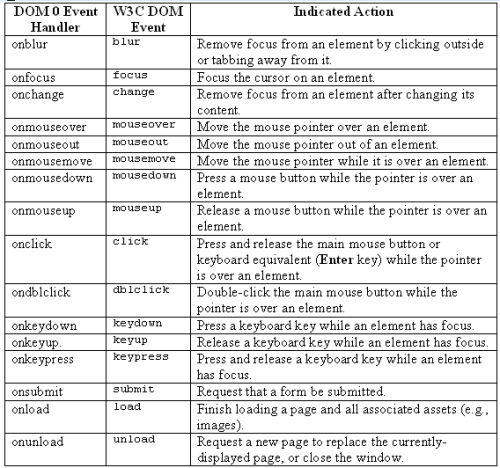
In using DOM 0 event handlers, once you have a reference to the element whose events you want to handle, it’s a simple matter of assigning a handling function to the appropriate property:
Example 13.1. handle_events.js (excerpt)


var mylink = document.getElementById("mylink");


mylink.onclick = engage;

...

function engage()

{

  alert("Engage!");


  return false;

}
You’ll note that, in the function assignment (button.onclick = engage;), parentheses do not follow the function name. Their inclusion would execute the function immediately, and assign the return value as the event handler. By omitting the parentheses, you can assign the function itself to the handler. This also means that you cannot supply arguments directly to the handling function: the function must obtain its information through other means.
Anonymous Functions
Instead of supplying a reference to a named function, you can supply an anonymous function for an event handler:
var mylink = document.getElementById("mylink");


mylink.onclick = function()

{

  alert("Engage!");


  return false;

}
Depending on whether you need to reuse the handling function (and your own coding preferences), this can be an easier way of writing event handling code.
The return value of the handling function determines whether the default action for that event occurs. So, in the preceding code, if mybutton were a hyperlink, its default action when clicked would be to navigate to its href location. By returning false, the engage function does not allow the default action to occur, and the hyperlink navigation will not take place. If the return value were true, the default action would occur after the event handling function’s code had executed.
When an event occurs, detailed information about the how, why, and where of that event is written to an event object. In Internet Explorer, this takes the form of a global window.event object, but in other browsers the object is passed as an argument to the event-handling function. This difference is fairly easy to address within the handling function:
Example 13.2. handle_events2.js (excerpt)


function engage(event)

{

  if (typeof event == "undefined")

  {

    event = window.event;

  }


  alert("The screen co-ordinates of your click were: " +

      event.screenX + ", " + event.screenY);


  return false;

}
The event object allows you to find out a range of details, such as which element was clicked, whether any keys were pressed, the coordinates of the event (e.g., where the cursor was located when the mouse button was clicked), and the type of event that triggered the function. Quite a few of the event property names are consistent across browsers, but a few differ. The Mozilla event properties can be viewed at the Gecko DOM Reference, while the Internet Explorer event properties can be seen at MSDN. For properties whose names vary between browsers, the potential for associated problems can normally be rectified with a little object detection; we’ll discuss this in detail later in this chapter.
The W3C Way (Event Listeners)
Although the DOM 0 event handlers are quick and easy, they do have limitations (aside from the fact that eventually they will become deprecated). The main advantage of the W3C event listeners is that they natively support the addition and removal of multiple handling functions for the same event on a single element. Event listeners also have the capability to respond to events in several phases (though most browsers don’t yet support this capability).
In the W3C specification, an event can be added to an element using the element’s addEventListener method, but Internet Explorer for Windows chooses to use a method called attachEvent, which has a slightly different syntax. (Internet Explorer for Mac doesn’t support either of these event models, so we have to rely on the DOM 0 handlers to work with events in this browser.)
To add an event listener in every browser except Internet Explorer, you would write code similar to this:
var mylink = document.getElementById("mylink");


mylink.addEventListener("click", engage, false);
To support Internet Explorer, you’d need this code:
var mylink = document.getElementById("mylink");


mylink.attachEvent("onclick", engage);
As well as the differing function names, it’s important to note that Internet Explorer uses the DOM 0 handler name for the event — "onclick" — rather than the true event name: "click". The extra argument that’s supplied to addEventListener specifies whether the listener is applied during the capture (true) or bubble (false) event propagation phase. Event propagation is explained in more detail in the discussion below, but bubble is really the most useful choice, and ensures the same behavior in standards-compliant browsers as in Internet Explorer.
The differences between these two approaches are fairly easy to work around using an abstracting function. We can also provide a fallback for browsers that don’t support W3C event listeners at the same time:
Example 13.3. handle_events3.js (excerpt)


function attachEventListener(target, eventType, functionRef,

    capture)

{

  if (typeof target.addEventListener != "undefined")

  {

    target.addEventListener(eventType, functionRef, capture);

  }

  else if (typeof target.attachEvent != "undefined")

  {

    target.attachEvent("on" + eventType, functionRef);

  }

  else

  {

    eventType = "on" + eventType;


    if (typeof target[eventType] == "function")

    {

      var oldListener = target[eventType];


      target[eventType] = function()

      {

        oldListener();


        return functionRef();

      };

    }

    else

    {

      target[eventType] = functionRef;

    }

  }

}
The first two if statements deal with the standards-based and Internet Explorer methods respectively, but the catch-all else deals with older browsers that don’t support either of these methods, particularly Internet Explorer 5 for Mac. In this last case, a DOM 0 event handler is used, but to ensure that multiple functions can be used to handle a single event for a particular element, a closure is used to execute any existing functions that are attached to the event.
Closures are an advanced feature of JavaScript that relates to scoping (which you can read about in Chapter 19, Object Orientation in JavaScript). Closures allow an inner function to reference the variables of the containing function even after the containing function has finished running. Simon Willison has explained their usage in relation to event handlers in some detail. Suffice it to say that closures allow us to stack multiple event handlers in browsers that don’t support W3C event listeners.
The cross-browser code for assigning an event listener is as follows:
Example 13.4. handle_events3.js (excerpt)


var mylink = document.getElementById("mylink");


attachEventListener(mylink, "click", engage, false);
Not (quite) the Genuine Article
Although the DOM 0 event handler fallback mimics the ability to add multiple event listeners for one event type on an element, it does not provide exact replication of the W3C event model, because specific handlers cannot be removed from an element.
Whereas DOM 0 handlers allowed the cancellation of an element’s default action by returning false, W3C event listeners achieve this goal slightly differently. To cancel a default action in this model, we need to modify the event object. Internet Explorer requires you to set its returnValue property to false; standards-based implementations offer the preventDefault method to do the same thing. We can create a small function that figures out the difference for us:
Example 13.5. handle_events4.js (excerpt)


function stopDefaultAction(event)

{

  event.returnValue = false;


  if (typeof event.preventDefault != "undefined")

  {

    event.preventDefault();

  }

}
We can call this function whenever we want to cancel the default action:
Example 13.6. handle_events4.js (excerpt)


function engage(event)

{

  if (typeof event == "undefined")

  {

    event = window.event;

  }


  alert("Engage!");


  stopDefaultAction(event);


  return false;

}
You still need to return false after executing stopDefaultAction in order to ensure that browsers that don’t support the W3C event model will also prevent the default action.
Safari and W3C Event Listeners
Due to a bug in Safari, it’s impossible to cancel the default action of clicking a hyperlink in that browser when using W3C event listeners. To achieve the cancellation, you’ll have to use DOM 0 event handlers with a return value of false.
Checking for attachEvent
Internet Explorer for Windows actually passes an event object to the event-handling function when attachEvent is used to attach an event listener. However, we still need to check for the existence of this object for any browsers that use the old event model.
One of the advantages of using W3C event listeners is that you can remove an individual listener from an element without disturbing any other listeners on the same event. This is not possible using the DOM 0 handlers.
Internet Explorer uses the detachEvent method, while the standards-compliant browsers instead specify a method called removeEventListener. Each of these methods operates fairly similarly to its listener-adding counterpart: an event type must be supplied along with the function that was assigned to handle that event type. The standard method also demands to know whether the event handler was registered to respond during the capture or bubble phase.
Here’s a function that supports this approach across browsers:
Example 13.7. handle_events5.js (excerpt)


function detachEventListener(target, eventType, functionRef,

    capture)

{

  if (typeof target.removeEventListener != "undefined")

  {

    target.removeEventListener(eventType, functionRef, capture);

  }

  else if (typeof target.detachEvent != "undefined")

  {

    target.detachEvent("on" + eventType, functionRef);

  }

  else

  {

    target["on" + eventType] = null;

  }

}
The W3C Event Model and Anonymous Functions
The W3C event model doesn’t allow for the removal of anonymous functions, so if you need to remove an event listener, hang onto a reference to the function in question.
In browsers that don’t support W3C event listeners, this function removes all event handlers on the given event: it’s not possible to remove just one of them and leave the others.
Discussion
Referencing the Target Element
Quite often, you’ll want to use the object that was the target of an event inside the event handler itself. With DOM 0 event handlers, the use of the special variable this inside a handling function will refer to the event target object. Consider this code:
Example 13.8. handle_events6.js (excerpt)


var mylink = document.getElementById("mylink");


mylink.onclick = engage;

...

function engage()

{

  var href = this.getAttribute("href");


  alert("Engage: " + href);


  return false;

}
Here, this refers to the link with ID mylink. We can use it to get the link’s href attribute.
However, if you use W3C event listeners, the target of the event is stored as part of the event object, under different properties in different browsers. Internet Explorer stores the target as srcElement, while the standards model stores it as target. But the element to which these properties point isn’t necessarily the element to which the event listener was assigned. It is, in fact, the deepest element in the hierarchy affected by the event. Take a look at the following HTML.
Example 13.9. handle_events6.html (excerpt)


<p>

  These are the voyages of the <a id="mylink"

      href="enterprise.html">starship Enterprise</a>.

</p>
If a click event listener were placed on the paragraph and a user clicked on the link, the paragraph’s click event handler would be executed, but the event target that was accessible through the above-mentioned properties would be the hyperlink. Some browsers (most notably, Safari) even go so far as to count the text node inside the link as the target node.
We can write a function that returns the event target irrespective of which property has been implemented, but this does not solve the problem of finding the element to which we originally applied the event listener. (The W3C Standard specifies another property called currentTarget, which lets you get the element to which the listener was assigned, but there is no Internet Explorer equivalent. Browsers that support currentTarget also set up the event handler-style this variable with the same value, but again, without Internet Explorer support, this isn’t particularly useful.) Often, the best resolution to this quandary is to iterate upwards from the event target provided by the browser until we find an element that’s likely to be the element to which we attached an event listener. To do this, we can perform checks against the element’s tag name, class, and other attributes.
The abstracting event target function would look like this:
Example 13.10. handle_events7.js (excerpt)


function getEventTarget(event)

{

  var targetElement = null;


  if (typeof event.target != "undefined")

  {

    targetElement = event.target;

  }

  else

  {

    targetElement = event.srcElement;

  }


  while (targetElement.nodeType == 3 &&

      targetElement.parentNode != null)

  {

    targetElement = targetElement.parentNode;

  }


  return targetElement;

}
The if-else retrieves the event target across browsers; the while loop then finds the first non-text-node parent if the target reported by the browser happens to be a text node.
If we want to retrieve the element that was clicked upon, we then make a call to getEventTarget:
Example 13.11. handle_events7.js (excerpt)


var mylink = document.getElementById("mylink");


attachEventListener(mylink, "click", engage, false);

...

function engage(event)

{

  if (typeof event == "undefined")

  {

    event = window.event;

  }


  var target = getEventTarget(event);


  while(target.nodeName.toLowerCase() != "a")

  {

    target = target.parentNode;

  }


  var href = target.getAttribute("href");


  alert("Engage: " + href);


  return true;

}
Because we know, in this case, that the event-handling function will be attached only to links (<a> tags), we can iterate upwards from the event target, checking for a node name of "a". The first one we find will be the link to which the handler was assigned; this ensures that we aren’t working with some element inside the link (such as a strong or a span).
Obviously, this method of target finding is not ideal, and cannot be 100% accurate unless you have knowledge of the exact HTML you’ll be working with. Recently, much effort has gone into resolving this problem, and quite a few of the proposed solutions offer the same this variable as is available under DOM 0 event handlers, and in browsers that support the W3C Standard for event listeners (not Internet Explorer).
One such solution is to make the event listening function a method of the target object in Internet Explorer. Then, when the method is called, this will naturally point to the object for which the method was called. This requires both the attachEventListener and detachEventListener to be modified:
Example 13.12. handle_events8.js (excerpt)


function attachEventListener(target, eventType, functionRef,

    capture)

{

  if (typeof target.addEventListener != "undefined")

  {

    target.addEventListener(eventType, functionRef, capture);

  }

  else if (typeof target.attachEvent != "undefined")

  {

    var functionString = eventType + functionRef;

    target["e" + functionString] = functionRef;


    target[functionString] = function(event)

    {

      if (typeof event == "undefined")

      {

        event = window.event;

      }

      target["e" + functionString](event);

    };


    target.attachEvent("on" + eventType, target[functionString]);

  }

  else

  {

    eventType = "on" + eventType;


    if (typeof target[eventType] == "function")

    {

      var oldListener = target[eventType];


      target[eventType] = function()

      {

        oldListener();


        return functionRef();

      }

    }

    else

    {

      target[eventType] = functionRef;

    }

  }

}


function detachEventListener(target, eventType, functionRef,

    capture)

{

  if (typeof target.removeEventListener != "undefined")

  {

    target.removeEventListener(eventType, functionRef, capture)

  }

  else if (typeof target.detachEvent != "undefined")

  {

    var functionString = eventType + functionRef;


    target.detachEvent("on" + eventType, target[functionString]);


    target["e" + functionString] = null;

    target[functionString] = null;

  }

  else

  {

    target["on" + eventType] = null;

  }

}
This line of thinking was well represented in entries to Peter Paul Koch’s improved addEvent competition.
Another solution by Dean Edwards totally eschews the W3C event model in favor of implementing DOM 0 event handlers with independent add and remove abilities.
Although both of these solutions may prove to be well written and robust, they’re largely untested as of this writing, so we’ll stick with the approach whose flaws we know and can handle: the one presented in the main solution. Besides, in practice, the process of iterating to find an event’s target isn’t as unreliable as it may appear to be.
What is Event Bubbling, and How do I Control it?
You may have noticed that we needed to supply a third argument to the W3C Standard addEventListener method, and that a capture argument was included in our attachEventListener function to cater for this. This argument determines the phase of the event cycle in which the listener operates.
Suppose you have two elements, one nested inside the other:
<p>

  <a href="untimely_death.html">Nameless Ensign</a>

</p>
When a user clicks on the link, click events will be registered on both the paragraph and the hyperlink. The question is, which one receives the event first?
The event cycle contains two phases, and each answers this question in a different way. In the capture phase, events work from the outside in, so the paragraph would receive the click first, then the hyperlink. In the bubble phase, events work from the inside out, so the anchor would receive the click before the paragraph.
Internet Explorer and Opera only support bubbling, which is why attachEvent doesn’t require a third argument. For browsers that support addEventListener, if the third argument is true, the event will be caught during the capture phase; if it is false, the event will be caught during the bubble phase.
In browsers that support both phases, the capture phase occurs first and is always followed by the bubble phase. It’s possible for an event to be handled on the same element in both the capture and bubbling phases, provided you set up listeners for each phase.
These phases also highlight the fact that nested elements are affected by the same event. If you no longer want an event to continue propagating up or down the hierarchy (depending upon the phase) after an event listener has been triggered, you can stop it. In Internet Explorer, this involves setting the cancelBubble property of the event object to true; in the W3C model, you must instead call its stopPropagation method:
Example 13.13. handle_events9.js (excerpt)


function stopEvent(event)

{

  if (typeof event.stopPropagation != "undefined")

  {

    event.stopPropagation();

  }

  else

  {

    event.cancelBubble = true;

  }

}
If we didn’t want an event to propagate further than our event handler, we’d use this code:
Example 13.14. handle_events9.js (excerpt)


var mylink = document.getElementById("mylink");


attachEventListener(mylink, "click", engage, false);


var paragraph = document.getElementsByTagName("p")[0];


attachEventListener(paragraph, "click", engage, false);


function engage(event)

{

  if (typeof event == "undefined")

  {

    event = window.event;

  }


  alert("She canna take no more cap'n!");


  stopEvent(event);


  return true;

}
Although we have assigned the engage function to listen for the click event on both the link and the paragraph that contains it, the function will only be called once per click, as the event’s propagation is stopped by the listener the first time it is called.
Finding the Size of an Element
There are so many variables that affect the size of an element — content length, CSS rules, font family, font size, line height, text zooming … the list goes on. Add to this the fact that browsers interpret CSS dimensions and font sizes inconsistently, and you can never predict the dimensions at which an element will be rendered. The only consistent way to determine an element’s size is to measure it once it’s been rendered by the browser.
Solution
You can tell straight away that it’s going to be useful to know exactly how big an element is. Well, the W3C can’t help: there’s no standardized way to determine the size of an element. Thankfully, the browser-makers have more or less settled on some DOM properties that let us figure it out.
Although box model differences mean that Internet Explorer includes padding and borders inconsistently as part of an element’s CSS dimensions, the offsetWidth and offsetHeight properties will consistently return an element’s width — including padding and borders — across all browsers.
Let’s imagine that an element’s dimensions were specified in CSS like this:
Example 13.15. find_size_element.css


#enterprise

{

  width: 350px;

  height: 150px;

  margin: 25px;

  border: 25px solid #000000;

  padding: 25px;

}
We can determine that element’s exact pixel width in JavaScript by checking the corresponding offsetWidth and offsetHeight properties:
Example 13.16. find_size_element.js (excerpt)


var starShip = document.getElementById("enterprise");

var pixelWidth = starShip.offsetWidth;

var pixelHeight = starShip.offsetHeight;
In Internet Explorer 6, Opera, Mozilla, and Safari, the variable pixelWidth will now be set to 450, and the variable pixelHeight will be set to 250. In Internet Explorer 5/5.5, pixelWidth will be 350 and pixelHeight 150, because those are the dimensions at which the broken box model approach used in those browsers will render the element. The values are different across browsers, but only because the actual rendered size differs as well. The offset dimensions consistently calculate the exact pixel dimensions of the element.
If we did not specify the dimensions of the element, and instead left its display up to the default block rendering (thus avoiding the box model bugs), the values would be comparable between browsers (allowing for scrollbar width differences, fonts, etc.).
Attaining the Correct Dimensions
In order to correctly determine the dimensions of an element you must wait until the browser has finished rendering that element, otherwise the dimensions may be different from those the user ends up seeing. There’s no guaranteed way to ensure that a browser has finished rendering an element, but it’s normally safe to assume that once a window’s load event has fired, all elements have been rendered.
Discussion
It is possible to retrieve the dimensions of an element minus its borders, but including its padding. These values are accessed using the clientWidth and clientHeight properties, and for the example element used above their values would be 300 and 100 in Internet Explorer 5/5.5, and 400 and 200 in all other browsers.
There is no property that will allow you to retrieve an element’s width without borders or padding.
Finding the Position of an Element
Knowing the exact position of an element is very helpful when you wish to position other elements relative to it. However, because of different browser sizes, font sizes, and content lengths, it’s often impossible to hard-code the position of an element before you load a page. JavaScript offers a method to ascertain any element’s position after the page has been rendered, so you can know exactly where your elements are located.
Solution
The offsetTop and offsetLeft properties tell you the distance between the top of an element and the top of its offsetParent. But what is offsetParent? Well, it varies widely for different elements and different browsers. Sometimes it’s the immediate containing element; other times it’s the html element; at other times it’s nonexistent.
Thankfully, the solution is to follow the trail of offsetParents and add up their offset positions — a method that will give you the element’s accurate absolute position on the page in every browser.
If the element in question has no offsetParent, then the offset position of the element itself is enough; otherwise, we add the offsets of the element to those of its offsetParent, then repeat the process for its offsetParent (if any):
Example 13.17. find_position_of_element.js (excerpt)


function getPosition(theElement)

{

  var positionX = 0;

  var positionY = 0;


  while (theElement != null)

  {

    positionX += theElement.offsetLeft;

    positionY += theElement.offsetTop;

    theElement = theElement.offsetParent;

  }


  return [positionX, positionY];

}
IE 5 for Mac Bug
Internet Explorer 5 for Mac doesn’t take the body’s margin or padding into account when calculating the offset dimensions, so if you desire accurate measurements in this browser, you should have zero margins and padding on the body.
Discussion
The method above works for simple and complex layouts; however, you may run into problems when one or more of an element’s ancestors has its CSS position property set to something other than static (the default).
There are so many possible combinations of nested positioning and browser differences that it’s almost impossible to write a script that takes them all into account. If you are working with an interface that uses a lot of relative or absolute positioning, it’s probably easiest to experiment with specific cases and write special functions to deal with them. Here are just a few of the differences that you might encounter:
- In Internet Explorer for Windows and Mozilla/Firefox, any element whose parent is relatively positioned will not include the parent’s border in its own offset; however, the parent’s offset will only measure to the edge of its border. Therefore, the sum of these values will not include the border distance.
- In Opera and Safari, any absolutely or relatively positioned element whose offsetParent is the body will include the body’s margin in its own offset. The body’s offset will include its own margin as well.
- In Internet Explorer for Windows, any absolutely positioned element inside a relatively positioned element will include the relatively positioned element’s margin in its offset. The relatively positioned element will include its margin as well.
Detecting the Position of the Mouse Cursor
When working with mouse events, such as mouseover or mousemove, you will often want to use the coordinates of the mouse cursor as part of your operation (e.g., to position an element near the mouse). The solution explained below is actually a more reliable method of location detection than the element position detection method we discussed in the section called “Finding the Position of an Element”, so if it’s possible to use the following solution instead of the previous one, go for it!
Solution
The event object contains everything you need to know to work with the position of the cursor, although a little bit of object detection is required to ensure you get equivalent values across all browsers.
The standard method of obtaining the cursor’s position relative to the entire page is via the pageX and pageY properties of the event object. Internet Explorer doesn’t support these properties, but it does include some properties that are almost the ones we want. clientX and clientY are available in Internet Explorer, though they measure the distance from the mouse cursor to the edges of the browser window. In order to find the position of the cursor relative to the entire page, we need to add the current scroll position to these dimensions. This technique was covered in Chapter 7, Working with Windows and Frames; let’s use the getScrollingPosition function from that solution to retrieve the required dimensions:
Example 13.18. detect_mouse_cursor.js (excerpt)


function displayCursorPosition(event)

{

  if (typeof event == "undefined")

  {

    event = window.event;

  }


  var scrollingPosition = getScrollingPosition();

  var cursorPosition = [0, 0];


  if (typeof event.pageX != "undefined" &&

      typeof event.x != "undefined")

  {

    cursorPosition[0] = event.pageX;

    cursorPosition[1] = event.pageY;

  }

  else

  {

    cursorPosition[0] = event.clientX + scrollingPosition[0];

    cursorPosition[1] = event.clientY + scrollingPosition[1];

  }


  var paragraph = document.getElementsByTagName("p")[0];


  paragraph.replaceChild(document.createTextNode(

      "Your mouse is currently located at: " + cursorPosition[0] +

      "," + cursorPosition[1]), paragraph.firstChild);


  return true;

}clientX/clientYare valid W3C DOM event properties that exist in most browsers, so we can't rely on their existence as an indication that we need to use them. Instead, within our event handler, we test for the existence ofpageX. Internet Explorer for Mac does havepageX, but it's an incorrect value, so we must also check forx.xis actually a nonstandard property, but most browsers support it (the exceptions being Opera 8+ and Internet Explorer). It's okay that Opera 8+ doesn't supportx, because theelsestatement is actually a cross-browser method for calculating the mouse cursor position except in Safari, which incorrectly givesclientXthe same value aspageX. That's why we still need to use both methods of calculating the cursor position.
Displaying a Tooltip when you Mouse Over an Element
Tooltips are a helpful feature in most browsers, but they can be a bit restrictive if you plan to use them as parts of your interface. If you’d like to use layers that appear when you want them to, aren’t truncated, and can contain more than plain text, why not make your own enhanced tooltips?
Solution
For this example, we’ll apply a class, hastooltip, on all the elements for which we’d like tooltips to appear. We’ll get the information that’s going to appear in the tooltip from each element’s title attribute:
Example 13.19. tooltips.html (excerpt)


<p>

  These are the voyages of the <a class="hastooltip"

      href="enterprise.html" title="USS Enterprise (NCC-1701) ...">

    starship Enterprise</a>.

</p>
From our exploration of browser events earlier in this chapter, you’ll probably already have realized that we need to set up some event listeners to let us know when the layer should appear and disappear.
Tooltips classically appear in a fixed location when you mouse over an element, and disappear when you mouse out. Some implementations of JavaScript tooltips also move the tooltip as the mouse moves over the element, but I personally find this annoying. In this solution, we’ll focus on the mouseover and mouseout events:
Example 13.20. tooltips.js (excerpt)


addLoadListener(initTooltips);


function initTooltips()

{

  var tips = getElementsByAttribute("class", "hastooltip");


  for (var i = 0; i < tips.length; i++)

  {

    attachEventListener(tips[i], "mouseover", showTip, false);

    attachEventListener(tips[i], "mouseout", hideTip, false);

  }


  return true;

}
We’ve already coded quite a few of the functions in this script, including addLoadListener from Chapter 1, Getting Started with JavaScript, getElementsByAttribute from Chapter 5, Navigating the Document Object Model, and the attachEventListener function that we created earlier in this chapter, so the bulk of the code is in the event listener functions:
Example 13.21. tooltips.js (excerpt)


function showTip(event)

{

  if (typeof event == "undefined")

  {

    event = window.event;

  }


  var target = getEventTarget(event);


  while (target.className == null ||

      !/(^| )hastooltip( |$)/.test(target.className))

  {

    target = target.parentNode;

  }


  var tip = document.createElement("div");

  var content = target.getAttribute("title");


  target.tooltip = tip;

  target.setAttribute("title", "");


  if (target.getAttribute("id") != "")

  {

    tip.setAttribute("id", target.getAttribute("id") + "tooltip");

  }


  tip.className = "tooltip";

  tip.appendChild(document.createTextNode(content));


  var scrollingPosition = getScrollingPosition();

  var cursorPosition = [0, 0];


  if (typeof event.pageX != "undefined" &&

      typeof event.x != "undefined")

  {

    cursorPosition[0] = event.pageX;

    cursorPosition[1] = event.pageY;

  }

  else

  {

    cursorPosition[0] = event.clientX + scrollingPosition[0];

    cursorPosition[1] = event.clientY + scrollingPosition[1];

  }


  tip.style.position = "absolute";

  tip.style.left = cursorPosition[0] + 10 + "px";

  tip.style.top = cursorPosition[1] + 10 + "px";

  document.getElementsByTagName("body")[0].appendChild(tip);


  return true;

}
After getting a cross-browser event object, and iterating from the base event target element to one with a class of hastooltip, showtip goes about creating the tooltip (a div). The content for the tooltip is taken from the title attribute of the target element, and placed into a text node inside the tooltip.
To ensure that the browser doesn’t display a tooltip of its own on top of our enhanced tooltip, the title of the target element is then cleared — now, there’s nothing for the browser to display as a tooltip, so it can’t interfere with the one we’ve just created. Don’t worry about the potential accessibility issues caused by removing the title: we’ll put it back later.
Controlling Tooltip Display in Opera
Opera still displays the original title even after we set it to an empty string. If you wish to avoid tooltips appearing in this browser, you’ll have to stop the default action of the mouseover using the stopDefaultAction function from the section called “Handling Events”, the first section of this chapter. Be aware that this will also affect other mouseover behavior, such as the status bar address display for hyperlinks.
To provide hooks for the styling of our tooltip, we assign the tooltip element an ID that’s based on the target element’s ID (targetIDtooltip), and set a class of tooltip. Although this approach allows for styles to be applied through CSS, we are unable to calculate the tooltip’s position ahead of time, so we must use the coordinates of the mouse cursor, as calculated when the event is triggered, to position the tooltip (with a few extra pixels to give it some space).
All that remains is to append the tooltip element to the body, so it will magically appear when we mouse over the link! With a little bit of CSS, it could look like Figure 13.1, “A dynamically generated layer that appears on mouseover”.
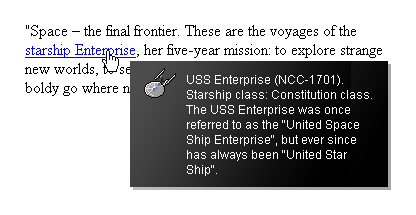
Figure 13.1. A dynamically generated layer that appears on mouseover
When the mouse is moved off the element, we delete the tooltip from the document, and it will disappear:
Example 13.22. tooltips.js (excerpt)


function hideTip(event)

{

  if (typeof event == "undefined")

  {

    event = window.event;

  }


  var target = getEventTarget(event);


  while (target.className == null ||

      !/(^| )hastooltip( |$)/.test(target.className))

  {

    target = target.parentNode;

  }


  if (target.tooltip != null)

  {

    target.setAttribute("title",

        target.tooltip.childNodes[0].nodeValue);

    target.tooltip.parentNode.removeChild(target.tooltip);

  }


  return false;

}
Earlier, in showTip, we created a reference to the tooltip element as a property of the target element. Having done that, we can remove it here without needing to search through the entire DOM. Before we remove the tooltip, we retrieve its content and insert it into the title of the target element, so we can use it again later.
Do those Objects Exist?
You should check that objects created in other event listeners actually exist before attempting to manipulate them, because events can often misfire, and you can’t guarantee that they will occur in a set order.
Discussion
One problem with the code above is that if the target element is close to the right or bottom edge of the browser window, the tooltip will be cut off. To avoid this, we need to make sure there’s enough space for the tooltip, and position it accordingly.
By checking, in each dimension, whether the mouse position is less than the browser window size minus the tooltip size, we can tell how far to move the layer in order to get it onto the screen:
Example 13.23. tooltips2.js (excerpt)


function showTip(event)

{

  if (typeof event == "undefined")

  {

    event = window.event;

  }


  var target = getEventTarget(event);


  while (target.className == null ||

      !/(^| )hastooltip( |$)/.test(target.className))

  {

    target = target.parentNode;

  }


  var tip = document.createElement("div");

  var content = target.getAttribute("title");


  target.tooltip = tip;

  target.setAttribute("title", "");


  if (target.getAttribute("id") != "")

  {

    tip.setAttribute("id", target.getAttribute("id") + "tooltip");

  }


  tip.className = "tooltip";

  tip.appendChild(document.createTextNode(content));


  var scrollingPosition = getScrollingPosition();

  var cursorPosition = [0, 0];


  if (typeof event.pageX != "undefined" &&

      typeof event.x != "undefined")

  {

    cursorPosition[0] = event.pageX;

    cursorPosition[1] = event.pageY;

  }

  else

  {

    cursorPosition[0] = event.clientX + scrollingPosition[0];

    cursorPosition[1] = event.clientY + scrollingPosition[1];

  }


  tip.style.position = "absolute";

  tip.style.left = cursorPosition[0] + 10 + "px";

  tip.style.top = cursorPosition[1] + 10 + "px";

  tip.style.visibility = "hidden";


  document.getElementsByTagName("body")[0].appendChild(tip);


  var viewportSize = getViewportSize();


  if (cursorPosition[0] - scrollingPosition[0] + 10 +

      tip.offsetWidth > viewportSize[0] - 25)

  {

    tip.style.left = scrollingPosition[0] + viewportSize[0] - 25 -

        tip.offsetWidth + "px";

  }

  else

  {

    tip.style.left = cursorPosition[0] + 10 + "px";

  }


  if (cursorPosition[1] - scrollingPosition[1] + 10 +

      tip.offsetHeight > viewportSize[1] - 25)

  {

    if (event.clientX > (viewportSize[0] - 25 - tip.offsetWidth))

    {

      tip.style.top = cursorPosition[1] - tip.offsetHeight - 10 +

          "px";

    }

    else

    {

      tip.style.top = scrollingPosition[1] + viewportSize[1] -

          25 - tip.offsetHeight + "px";

    }

  }

  else

  {

    tip.style.top = cursorPosition[1] + 10 + "px";

  }


  tip.style.visibility = "visible";


  return true;

}
This function is identical to the previous version until we get to the insertion of the tooltip element. Just prior to inserting the element, we set its visibility to "hidden". This means that when it’s placed on the page, the layer will occupy the same space it would take up if it were visible, but the user won’t see it on the page. This allows us to measure the tooltip’s dimensions, then reposition it without the user seeing it flash up in its original position.
In order to detect whether the layer displays outside of the viewport, we use the position of the cursor relative to the viewport. This could theoretically be obtained by using clientX/clientY, but remember: Safari gives an incorrect value for this property. Instead, we use our cross-browser values inside cursorPosition and subtract the scrolling position (which is the equivalent of clientX/clientY). The size of the viewport is obtained using the getViewportSize function we created in Chapter 7, Working with Windows and Frames, then, for each dimension, we check whether the cursor position plus the size of the layer is greater than the viewport size (minus an allowance for scrollbars).
If part of the layer is going to appear outside the viewport, we position it by subtracting its dimensions from the viewport size; otherwise, it’s positioned normally, using the cursor position.
The only other exception to note is that if the layer would normally appear outside the viewport in both dimensions, when we are positioning it vertically, it is automatically positioned above the cursor. This prevents the layer from appearing directly on top of the cursor and triggering a mouseout event. It also prevents the target element from being totally obscured by the tooltip, which would prevent the user from clicking on it.
Measuring Visible Tooltip Dimensions
In order for the dimensions of the tooltip to be measured it must first be appended to the document. This will automatically make it appear on the page, so to prevent the user seeing it display in the wrong position, we need to hide it. We do so by setting its visibility to "hidden" until we have finalized the tooltip’s position.
We can’t use the more familiar display property here, because objects with display set to "none" are not rendered at all, so they have no dimensions to measure.
Sorting Tables by Column
Tables can be a mine of information, but only if you can understand them properly. Having the ability to sort a table by its different columns allows users to view the data in a way that makes sense to them, and ultimately provides the opportunity for greater understanding.
Solution
To start off, we’ll use a semantically meaningful HTML table. This will provide us with the structure we need to insert event listeners, inject extra elements, and sort our data:
Example 13.24. sort_tables_by_columns.html (excerpt)


<table class="sortableTable" cellspacing="0"

    summary="Statistics on Star Ships">

  <thead>

    <tr>

      <th class="c1" scope="col">

        Star Ship Class

      </th>

      <th class="c2" scope="col">

        Power Output (Terawatts)

      </th>

      <th class="c3" scope="col">

        Maximum Warp Speed

      </th>

      <th class="c4" scope="col">

        Captain's Seat Comfort Factor

      </th>

    </tr>

  </thead>

  <tbody>

    <tr>

      <td class="c1">

        USS Enterprise NCC-1701-A

      </td>

      <td class="c2">

        5000

      </td>

      <td class="c3">

        6.0

      </td>

      <td class="c4">

        4/10

      </td>

    </tr>
First, we need to set up event listeners on each of our table heading cells. These will listen for clicks to our columns, and trigger a sort on the column that was clicked:
Example 13.25. sort_tables_by_columns.js (excerpt)


function initSortableTables()

{

  if (identifyBrowser() != "ie5mac")

  {

    var tables = getElementsByAttribute("class", "sortableTable");


    for (var i = 0; i < tables.length; i++)

    {

      var ths = tables[i].getElementsByTagName("th");


      for (var k = 0; k < ths.length; k++)

      {

        var newA = document.createElement("a");

        newA.setAttribute("href", "#");

        newA.setAttribute("title",

            "Sort by this column in descending order");


        for (var m = 0; m < ths[k].childNodes.length; m++)

        {

          newA.appendChild(ths[k].childNodes[m]);

        }


        ths[k].appendChild(newA);


        attachEventListener(newA, "click", sortColumn, false);

      }

    }

  }


  return true;

}
Internet Explorer 5 for Mac has trouble dealing with dynamically generated table content, so we have to specifically exclude it from making any of the tables sortable.
Only tables with the class sortableTable will be turned into sortable tables, so initSortableTable navigates the DOM to find the table heading cells in these tables. Once they’re found, the contents of each heading cell are wrapped in a hyperlink — this allows keyboard users to select a column to sort the table by — and an event listener is set on these links to monitor click events, and execute sortColumn in response. The title attribute of each link is also set, providing the user with information on what will happen when the link is clicked.
The sortColumn function is fairly lengthy, owing to the fact that it must navigate and rearrange the entire table structure each time a heading cell is clicked:
Example 13.26. sort_tables_by_columns.js (excerpt)


function sortColumn(event)

{

  if (typeof event == "undefined")

  {

    event = window.event;

  }


  var targetA = getEventTarget(event);


  while (targetA.nodeName.toLowerCase() != "a")

  {

  targetA = targetA.parentNode;

  }


  var targetTh = targetA.parentNode;

  var targetTr = targetTh.parentNode;

  var targetTrChildren = targetTr.getElementsByTagName("th");

  var targetTable = targetTr.parentNode.parentNode;

  var targetTbody = targetTable.getElementsByTagName("tbody")[0];

  var targetTrs = targetTbody.getElementsByTagName("tr");

  var targetColumn = 0;


  for (var i = 0; i < targetTrChildren.length; i++)

  {

    targetTrChildren[i].className = targetTrChildren[i].className.

        replace(/(^| )sortedDescending( |$)/, "$1");

    targetTrChildren[i].className = targetTrChildren[i].className.

        replace(/(^| )sortedAscending( |$)/, "$1");


    if (targetTrChildren[i] == targetTh)

    {

      targetColumn = i;


      if (targetTrChildren[i].sortOrder == "descending" &&

          targetTrChildren[i].clicked)

      {

        targetTrChildren[i].sortOrder = "ascending";

        targetTrChildren[i].className += " sortedAscending";

        targetA.setAttribute("title",

            "Sort by this column in descending order");

      }

      else

      {

        if (targetTrChildren[i].sortOrder == "ascending" &&

            !targetTrChildren[i].clicked)

        {

          targetTrChildren[i].className += " sortedAscending";

        }


        else

        {

          targetTrChildren[i].sortOrder = "descending";

          targetTrChildren[i].className += " sortedDescending";

          targetA.setAttribute("title",

              "Sort by this column in ascending order");

        }

      }


      targetTrChildren[i].clicked = true;

    }

    else

    {

      targetTrChildren[i].clicked = false;


      if (targetTrChildren[i].sortOrder == "ascending")

      {

        targetTrChildren[i].firstChild.setAttribute("title",

            "Sort by this column in ascending order");

      }

      else

      {

        targetTrChildren[i].firstChild.setAttribute("title",

            "Sort by this column in descending order");

      }

    }

  }


  var newTbody = targetTbody.cloneNode(false);


  for (var i = 0; i < targetTrs.length; i++)

  {

    var newTrs = newTbody.childNodes;

    var targetValue = getInternalText(

        targetTrs[i].getElementsByTagName("td")[targetColumn]);


    for (var j = 0; j < newTrs.length; j++)

    {

      var newValue = getInternalText(

          newTrs[j].getElementsByTagName("td")[targetColumn]);


      if (targetValue == parseInt(targetValue, 10) &&

          newValue == parseInt(newValue, 10))

      {

        targetValue = parseInt(targetValue, 10);

        newValue = parseInt(newValue, 10);

      }

      else if (targetValue == parseFloat(targetValue) &&

          newValue == parseFloat(newValue))

      {

        targetValue = parseFloat(targetValue, 10);

        newValue = parseFloat(newValue, 10);

      }


      if (targetTrChildren[targetColumn].sortOrder ==

          "descending")

      {

        if (targetValue >= newValue)

        {

          break;

        }

      }

      else

      {

        if (targetValue <= newValue)

        {

          break;

        }

      }

    }


    if (j >= newTrs.length)

    {

      newTbody.appendChild(targetTrs[i].cloneNode(true));

    }

    else

    {

      newTbody.insertBefore(targetTrs[i].cloneNode(true),

          newTrs[j]);

    }

  }


  targetTable.replaceChild(newTbody, targetTbody);


  stopDefaultAction(event);


  return false;

}
The first for loop that occurs after all the structural variables have been defined sets the respective states for each of the table heading cells when one of them is clicked. Not only are classes maintained to identify the heading cell on which the table is currently sorted, but a special sortOrder property is maintained on each cell to determine the order in which that column is sorted. Initially, a column will be sorted in descending order, but if a heading cell is clicked twice consecutively, the sort order will be changed to reflect an ascending sequence. Each heading cell remembers the sort order state it exhibited most recently, and the column is returned to that state when its heading cell is re-selected. The title of the hyperlink for a clicked heading cell is also rewritten depending upon the current sort order, and what the sort order would be if the user clicked on it again.
The second for loop sorts each of the rows that’s contained in the body of the table. A copy of the original tbody is created to store the reordered table rows, and initially this copy is empty. As each row in the original tbody is scanned, the contents of the table cell in the column on which we’re sorting is compared with the rows already in the copy.
In order to find the contents of the table cell, we use the function getInternalText:
Example 13.27. sort_tables_by_columns.js (excerpt)


function getInternalText(target)

{

  var elementChildren = target.childNodes;

  var internalText = "";


  for (var i = 0; i < elementChildren.length; i++)

  {

    if (elementChildren[i].nodeType == 3)

    {

      if (!/^s*$/.test(elementChildren[i].nodeValue))

      {

        internalText += elementChildren[i].nodeValue;

      }

    }

    else

    {

      internalText += getInternalText(elementChildren[i]);

    }

  }


  return internalText;

}
getInternalText extracts all of the text inside an element -- including all of its descendant elements -- by recursively calling itself for each child element and concatenating the resultant values together. This allows us to access the text inside a table cell, irrespective of whether it's wrapped in elements such as spans, strongs, or ems. Any text nodes that are purely whitespace (spaces, tabs, or new lines) are ignored via a regular expression check.When sortColumn finds a row in the copy whose sorted table cell value is “less” than the one we’re scanning, we insert a copy of the scanned row into the copied tbody. For a column in ascending order, we simply reverse this comparison: the value of the row in the copy must be “greater” than that of the scanned row.
However, before a comparison is made, we check whether the contents of the sorted table cell can be interpreted as an integer or a float; if so, the comparison values are converted. This makes sure that columns that contain numbers are sorted properly; string comparisons will produce different results than number comparisons.
Once all of our original rows have been copied into the new tbody, that element is used to replace the old one, and we have our sorted table!
Using the sortableDescending and sortableAscending classes, which are assigned to the currently sorted table heading cells, we can use CSS to inform the user which column the table is sorted on, and how it is sorted, as shown in Figure 13.2, “A sortable table sorted in descending order on the fourth column” and Figure 13.3, “A sortable table sorted in ascending order on the second column”.
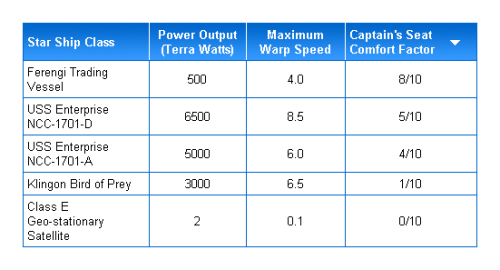
Figure 13.2. A sortable table sorted in descending order on the fourth column
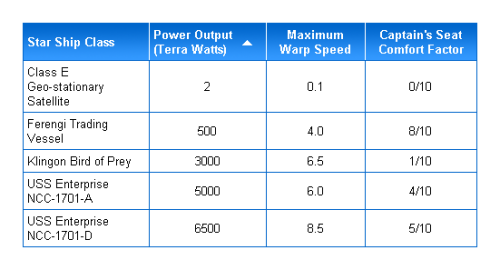
Figure 13.3. A sortable table sorted in ascending order on the second column
Summary
The two main pillars of DHTML are the capturing of events, and the reorganization and creation of page elements via the DOM. Using these principles, it’s possible to capture many of the different ways that users interact with a page and make the interface respond accordingly.
As can be seen by the number and quality of JavaScript-enhanced web applications that are now available, the features DHTML can bring to new interfaces represents one of the biggest growth areas for innovative JavaScript. The foundations and basic examples shown in this chapter give you a sense of the power that it can deliver inside a user’s browser. We’ll expand upon this further in the following chapters as we build some really interesting interfaces.
That’s it for our sample of The JavaScript Anthology: 101 Essential Tips, Tricks & Hacks. What’s next?
Download this sample as a PDF, for reading offline. Check out the book’s Table of Contents to see what else it covers. And see what others think of the book — read live customer reviews of The JavaScript Anthology: 101 Essential Tips, Tricks & Hacks.
Frequently Asked Questions (FAQs) about JavaScript from Scratch
What is the importance of JavaScript in web development?
JavaScript is a crucial component in web development. It is a programming language that allows you to implement complex features on web pages. When a web page goes beyond just showing static information, such as displaying timely content updates, interactive maps, animated graphics, or scrolling video jukeboxes, JavaScript is involved. It is the third layer of the layer cake of standard web technologies, two of which (HTML and CSS) we have used extensively in our previous articles.
How can I start learning JavaScript from scratch?
Starting to learn JavaScript from scratch can seem daunting, but it’s entirely manageable if you break it down into smaller, manageable steps. Start by understanding the basics of HTML and CSS as they form the foundation of web development. Then, you can gradually move on to JavaScript basics like variables, data types, functions, loops, and conditionals. Practice is key in learning JavaScript, so ensure you code regularly.
What are some common mistakes beginners make when learning JavaScript?
Some common mistakes beginners make when learning JavaScript include not understanding the difference between JavaScript and Java, not spending enough time understanding the basics, and not practicing enough. JavaScript is a unique language with its own concepts and structures, and it’s important to understand these before moving on to more complex topics. Regular practice and application of concepts learned are crucial in mastering JavaScript.
Can I learn JavaScript without any prior programming experience?
Yes, you can learn JavaScript without any prior programming experience. While having a background in programming can make the learning process easier, it’s not a prerequisite. JavaScript is often recommended as a good first language for beginners because of its forgiving syntax and wide usage in web development.
How long does it take to learn JavaScript from scratch?
The time it takes to learn JavaScript from scratch can vary greatly depending on your prior experience, the time you can dedicate to learning, and the depth of knowledge you wish to achieve. On average, if you’re starting from scratch and dedicating a few hours every day, you can expect to learn the basics in a few weeks to a few months.
What are the best resources for learning JavaScript?
There are numerous resources available for learning JavaScript. Online platforms like Codecademy, Udemy, and freeCodeCamp offer comprehensive courses. Books like “Eloquent JavaScript” and “You Don’t Know JS” are also highly recommended. Additionally, Mozilla Developer Network (MDN) has extensive documentation on JavaScript.
How is JavaScript used in front-end development?
In front-end development, JavaScript is used to make web pages dynamic and interactive. It can be used to create features like sliders, form validations, pop-ups, and more. It also allows you to manipulate the Document Object Model (DOM), enabling you to change the content and layout of a webpage in real time.
Can I use JavaScript for back-end development?
Yes, JavaScript can be used for back-end development. Node.js is a JavaScript runtime that allows you to run JavaScript on your server. With Node.js, you can build entire web applications using just JavaScript.
What are JavaScript frameworks and libraries, and why are they useful?
JavaScript frameworks and libraries are pre-written JavaScript code that can be used to simplify complex coding tasks. They provide a structure for JavaScript code, making it easier to build large-scale, maintainable, and scalable web applications. Examples include React.js, Angular.js, and Vue.js.
What is the future of JavaScript?
JavaScript continues to be a dominant force in web development and its future looks promising. With the rise of frameworks like React, Angular, and Vue, JavaScript is becoming more powerful and versatile. Additionally, the development of Node.js has expanded JavaScript’s reach to the server-side, making it a full-stack language. As web applications continue to grow in complexity, the demand for skilled JavaScript developers is likely to remain high.