I remember my creating my first image-less speech bubble many years ago. It required a long-winded JavaScript function to inject elements into the DOM, some horrendous CSS, looked fairly awful, and didn’t work well in IE5.
CSS3 is starting to change our lives for the better. It’s now possible to create a great looking speech bubble which works in all browsers, uses a single HTML element, a few lines of CSS3 code, no images, and no JavaScript whatsoever…

To ease you in gently, let’s examine the HTML. A single element is required, so I’m using a P tag:
<p class="speech">SitePoint Rocks!</p>
First, we’ll style the outer box:
p.speech {

  position: relative;

  width: 200px;

  height: 100px;

  text-align: center;

  line-height: 100px;

  background-color: #fff;

  border: 8px solid #666;

  -webkit-border-radius: 30px;

  -moz-border-radius: 30px;

  border-radius: 30px;

  -webkit-box-shadow: 2px 2px 4px #888;

  -moz-box-shadow: 2px 2px 4px #888;

  box-shadow: 2px 2px 4px #888;

}
Nothing too complicated there. The only essential property is position: relative which is necessary for the speech bubble pointer. We also require Mozilla and Webkit vendor prefixes for border-radius and box-shadow to ensure they work in all CSS3 browsers. IE8 and below will show squared corners and no shadow, but the box will still be visible.

Now we need to create the triangular bubble pointer. Rather than resorting to images, we can use CSS borders to create any type of triangle. As a brief explanation, examine an element with wide differently-colored borders:

If we reduce the width and height of our element to 0px and use different sized borders, we can see different triangles being formed:

For our speech bubble pointer, we can therefore use a solid top and left border with transparent right and bottom borders:

But what do we assign those border properties to? Fortunately, we can use the CSS :before and :after pseudo-elements to generate two more content items. Therefore:
p.speech:before {

  content: ' ';

  position: absolute;

  width: 0;

  height: 0;

  left: 30px;

  top: 100px;

  border: 25px solid;

  border-color: #666 transparent transparent #666;

}
The triangle is positioned at the bottom of our bubble. Incidentally, don’t bother trying to apply a shadow to this element — it’ll be shown around the transparent borders rather than the visible triangle.

We must now remove a section of this triangle. We can position a smaller white triangle over the gray one to achieve that effect:
p.speech:after {

  content: ' ';

  position: absolute;

  width: 0;

  height: 0;

  left: 38px;

  top: 100px;

  border: 15px solid;

  border-color: #fff transparent transparent #fff;

}
Our pure CSS3 image-less speech bubble is complete.
In essence, we can utilize the :before and :after pseudo-elements to create many different effects. For example, a thought bubble can be created with two content items rounded into circles:
p.thought {

  position: relative;

  width: 130px;

  height: 100px;

  text-align: center;

  line-height: 100px;

  background-color: #fff;

  border: 8px solid #666;

  -webkit-border-radius: 58px;

  -moz-border-radius: 58px;

  border-radius: 58px;

  -webkit-box-shadow: 2px 2px 4px #888;

  -moz-box-shadow: 2px 2px 4px #888;

  box-shadow: 2px 2px 4px #888;

}
p.thought:before, p.thought:after {

  left: 10px;

  top: 70px;

  width: 40px;

  height: 40px;

  background-color: #fff;

  border: 8px solid #666;

  -webkit-border-radius: 28px;

  -moz-border-radius: 28px;

  border-radius: 28px;

}
p.thought:after {

  width: 20px;

  height: 20px;

  left: 5px;

  top: 100px;

  -webkit-border-radius: 18px;

  -moz-border-radius: 18px;

  border-radius: 18px;

}
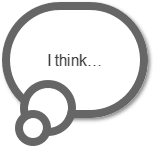
Please see the demonstration page for an example which uses these techniques. All the CSS code is contained in the HTML source.
Have you used similar techniques to create other effects?
If you enjoyed reading this post, you’ll love Learnable; the place to learn fresh skills and techniques from the masters. Members get instant access to all of SitePoint’s ebooks and interactive online courses, like Learn CSS3.
Comments on this article are closed. Have a question about CSS3? Why not ask it on our forums?
Frequently Asked Questions (FAQs) about Pure CSS3 Speech Bubbles
How can I create a speech bubble with a border in CSS3?
Creating a speech bubble with a border in CSS3 involves using the border property. First, you need to create a div for the speech bubble and assign it a class. Then, in your CSS, you can define the border property for that class. You can specify the border color, width, and style. For example:.bubble {
border: 2px solid black;}
This will create a black border around your speech bubble. You can customize the color, width, and style to suit your needs.
Can I add a shadow to my CSS3 speech bubble?
Yes, you can add a shadow to your CSS3 speech bubble using the box-shadow property. This property allows you to create a shadow effect around the box. You can specify the horizontal and vertical offsets, blur radius, spread radius, and color of the shadow. For example:.bubble {
box-shadow: 5px 5px 10px rgba(0, 0, 0, 0.5);}
This will create a shadow that is offset 5px to the right and 5px down from the bubble, with a blur radius of 10px and a color of semi-transparent black.
How can I position the arrow of the speech bubble?
The position of the arrow of the speech bubble can be adjusted using the “top”, “bottom”, “left”, or “right” properties in CSS3. For instance, if you want the arrow to appear at the bottom of the bubble, you can use the “bottom” property and set it to a negative value. Here’s an example:.bubble:after {
bottom: -20px;}
This will position the arrow 20px up from the bottom of the bubble.
Can I create a speech bubble with rounded corners in CSS3?
Yes, you can create a speech bubble with rounded corners using the border-radius property in CSS3. This property allows you to define how rounded the border corners should be. For example:.bubble {
border-radius: 10px;}
This will create a speech bubble with corners that are rounded by 10px.
How can I change the color of the speech bubble?
The color of the speech bubble can be changed using the background-color property in CSS3. This property sets the background color of an element. For example:.bubble {
background-color: #f00;}
This will change the background color of the speech bubble to red.
Can I add text to the speech bubble?
Yes, you can add text to the speech bubble by simply including it within the div in your HTML. For example:<div class="bubble">This is a speech bubble.</div>
This will display the text “This is a speech bubble.” inside the speech bubble.
How can I adjust the size of the speech bubble?
The size of the speech bubble can be adjusted using the width and height properties in CSS3. These properties set the width and height of an element. For example:.bubble {
width: 200px;
height: 100px;}
This will create a speech bubble that is 200px wide and 100px tall.
Can I create a speech bubble with a gradient background in CSS3?
Yes, you can create a speech bubble with a gradient background using the linear-gradient function in CSS3. This function creates an image consisting of a progressive transition between two or more colors along a straight line. For example:.bubble {
background: linear-gradient(to right, red, orange);}
This will create a speech bubble with a background that transitions from red to orange from left to right.
How can I make the speech bubble responsive?
You can make the speech bubble responsive by using relative units such as percentages for the width and height properties instead of absolute units like pixels. This will allow the size of the speech bubble to adjust based on the size of the viewport. For example:.bubble {
width: 50%;
height: 30%;}
This will create a speech bubble that takes up 50% of the width and 30% of the height of the viewport.
Can I animate the speech bubble in CSS3?
Yes, you can animate the speech bubble using keyframes in CSS3. Keyframes are used to specify the behavior of one cycle of a CSS animation. For example, you can create a simple fade-in animation like this:@keyframes fadeIn {
from {opacity: 0;}
to {opacity: 1;}}.bubble {
animation: fadeIn 2s;}
This will make the speech bubble fade in over a period of 2 seconds.