Designing Tweets: How To Integrate Twitter Into Your Web Site

By | | Web Design Tutorials & Articles

Twitter

In order to grab your attention and have you follow them on Twitter, some web site owners choose to go beyond a simple “Follow Me” and also display their latest tweets. I don’t know if one method is preferable over the other in order to actually pick up followers, but I thought it might be helpful to take a look at how you can display tweets and also how some designers are making their tweets stand out, or in some cases blend in to the overall design.

So how do you actually get your tweets to display? Well there are a number of options.

Twitter Widgets

If you’re blogging or using MySpace or Facebook, you can grab a widget to work in the appropriate social media area. They’re available as Flash or HTML; all you need to do is copy the code and paste it into your site.
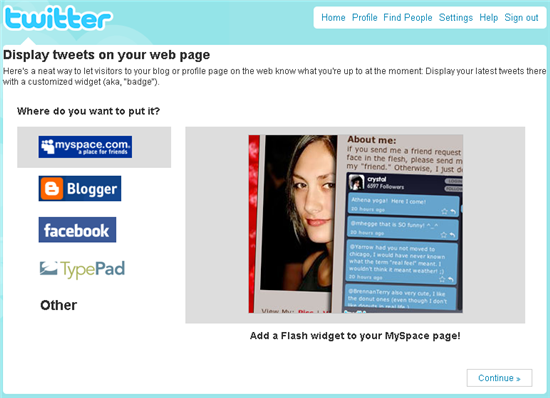

twitter-widgets

Twitter Goodies

Twitter also provides all users with a profile widget which can be added to most web sites by grabbing the code the provided. You can configure the size, colors and number of updates for your badge in the settings.
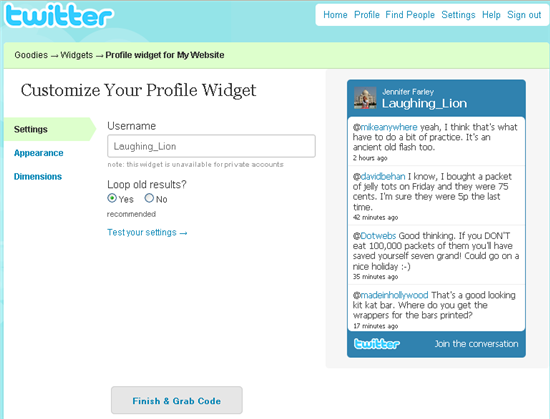
twitter-goodies

jQuery Plugins

There are a quite a few of these plugins around which all provide tweet display functionality as well as a few other bells and whistles.

Juitter is a widget which will display tweets to or from a user and has an option to display avatars.

TwitStream uses the Twitter Search API to display a list from your twitter feed containing a particular keyword and also displays avatars and URLS.

If you want to add your tweets to your WordPress blog, Twitter For WordPress does what is says on the tin, displaying your recent tweets and URLs.

Designed Tweets

Although many sites are displaying tweets, some designers are going that extra mile to incorporate the Twitter feed into their overall design. It’s the attention to detail that makes them interesting to look at. Here are five imaginative examples of Twitter integration.

Justin Delabar
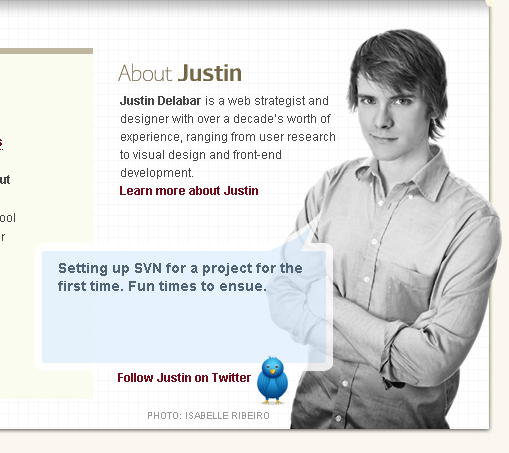
JustinDelabar

That Indie Dude

thatindiedude

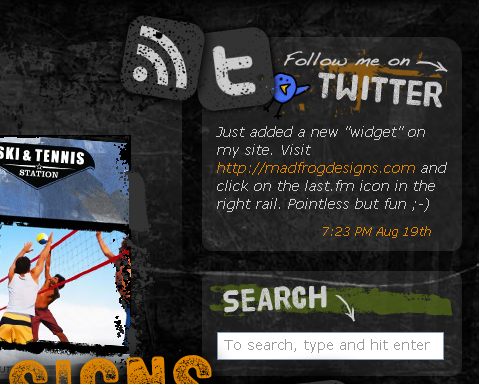
Mad Frog Designs

madfrog

Jeff Sarmiento

jeffsarmiento

Indiqo

indiqo

What do you do with your tweets? Have you integrated them into your site and what method do you use? Or do you just ask for a follow? Have you seen any other Tweet displays that you liked?

Jennifer Farley

Jennifer Farley is a designer, illustrator and design instructor based in Ireland. She writes about design and illustration on her blog at Laughing Lion Design.


More Posts - Website - Twitter

{ 19 comments }

chaos November 16, 2011 at 1:45 pm

cool

wbarber69 August 3, 2011 at 12:09 am

I want to add a way to actually update my status right from my on site

HaHar June 29, 2011 at 9:24 am

Love it so much!!!

HaHa Look June 29, 2011 at 9:15 am

Thanks for sharing!

Anonymous June 29, 2011 at 10:25 am

it is really amazing~~#fb

Anonymous June 30, 2011 at 1:58 am

it is so cool man!

Jennifer Farley September 10, 2009 at 11:48 pm

Thanks everyone for the comments and suggestions.

@TomBradshaw – Tom I love the Twitter icons. They’re very cool.

hutchsky September 9, 2009 at 12:51 pm

A super simple solution is Tweetboard. (http://tweetboard.com/alpha/) You have to request an invite because it’s in alpha testing, but it works great for me.

TomBradshaw September 7, 2009 at 11:30 pm

This was really useful, I’ve been looking for a way to display my tweets on my site without using the twitter widget. Thanks Jennifer

ps. Check out my Twitter Icon Set: http://www.webdesign-gm.co.uk/news/?p=30

ejrodgers September 5, 2009 at 12:14 am

@dreamache

Thanks for the comments…

The photo is me, I was building some decking, it’s a photo of me I like, which is rare. As the page title says, it’s a personal site so why wouldn’t it have pictures of me? I’ve had a lot of positive feedback on the whole journal theme and right sided menu.

I tried to return the favour and visit your site but it didn’t seem to be working.

Dan Wellman September 5, 2009 at 12:03 am

I built a tweet-stream widget as a jQuery tutorial example which uses Yahoo Pipes and JSONP to get tweets without flash or any server-side code :D

check it out: tweetstream

lyteis September 4, 2009 at 11:54 pm

I recently utilized some twitter API functionality for a client’s “latest news” division on their homepage. The client can update the latest news division of their page from a cell phone or wherever they are most comfortable. It’s pretty useful for busy clients who want to update their site easily from anywhere.

I also used the php substr() function to format the ugly date returned by the API.

allofcraigs September 4, 2009 at 6:00 pm

i have a little Twitter sumthin-sumthin integrated into my site for my craigslist search engine that scrapes any craigslist ad link posted to twitter and is categorized to the right automatically. Somewhat pointless.

twitter stream

it’s called “juitter”

Shyam Kapur September 4, 2009 at 4:27 pm

This is an excellent post. I would also like to share my excitement about some widgets that were launched this week by the new Twitter-based semantic search engine TipTop. A search in TipTop on any topic quickly reveals people’s emotions and experiences about it, as well as other concepts that they are discussing in connection with the original search. Various interactive features on the site allow the user to navigate among these messages using filters and categories, or discover more about the people whose messages they like.

TipTop search results can be embedded in any website and many blogging platforms using the newly-launched TipTop Search Widgets. By customizing TipTop Search Widgets with searches relevant to a website, any site developer or blogger can enrich their own visitors’ experience with real time information delivered contextually. Please come over to TipTop now and set up your free TipTop widgets.

nathanhoad September 4, 2009 at 10:28 am

I have a little cartoonified me popping in from the ceiling and shouting out my latest tweet. Have a look at nathanhoad.net.

dreamache September 4, 2009 at 9:11 am

ejrodgers, seriously man, your website..

(1) Why do you have a picture (presumably of yourself) without your shirt and bending over?
(2) The right-aligned vertical navigation is really bad for usability/readability. It’s okay to try and be unique, but don’t do it at the expense of your visitors.

Nathan September 4, 2009 at 9:10 am

I have a little cartoonified me popping in from the ceiling and shouting out my latest tweet. Have a look at http://nathanhoad.net.

ejrodgers September 4, 2009 at 5:18 am

I’ve intregated Twitter in the Latest Content display on the index page and adapted if further so it doesn’t display @ replies (since most of these wont make sense on their own) or Latest Blog Post Tweets (since these are shown on the page anyway) instead it displays the last “normal” tweet. I’ve also modified the output so that any URLs (inc. TinyURL etc) that point away from my site open in a new tab/window and on site links open in same tab. I also have “friendly dates” (eg: about four hours ago).

You can see the result at my site http://www.elliottrodgers.com/index.php

kwncy September 4, 2009 at 4:06 am

cool, i love That Indie Dude’s design :D

Comments on this entry are closed.