Here’s a neat Windows 7 trick that’s been doing the rounds on the Internet. It enables “GodMode,” a term devised by the Microsoft development team, which provides a single place to access all Windows settings without needing to browse options and folders in the Control Panel.
To use it:
Here’s a neat Windows 7 trick that’s been doing the rounds on the Internet. It enables “GodMode,” a term devised by the Microsoft development team, which provides a single place to access all Windows settings without needing to browse options and folders in the Control Panel.
To use it:
- Create a new folder.
 Rename the folder to
GodMode.{ED7BA470-8E54-465E-825C-99712043E01C}
(note that you can change the “GodMode” text, but the following period and code number are essential).
Rename the folder to
GodMode.{ED7BA470-8E54-465E-825C-99712043E01C}
(note that you can change the “GodMode” text, but the following period and code number are essential).- The folder icon will change — double click it to show the GodMode window:
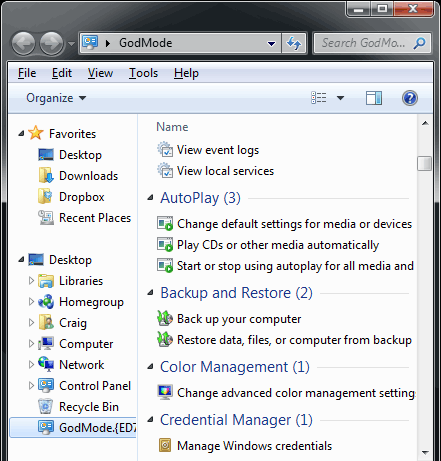 The window shows nearly 50 sections with quick links to configuration options. Strictly speaking, it’s not a God Mode since all the options are available elsewhere. It’s more akin to an “all tasks” list — but you may find it easier than stumbling through Windows numerous screens and panels.
Big Red Warning!
The trick appears to work on both the 32 and 64-bit versions of Windows 7. Vista 32-bit and Windows Server 2008 32-bit should also work. However, it is known to crash 64-bit versions of Vista — and you may need to boot in safe mode or to the command line to delete the folder.
If you enjoyed reading this post, you’ll love Learnable; the place to learn fresh skills and techniques from the masters. Members get instant access to all of SitePoint’s ebooks and interactive online courses, like Making Money With Your Blog.
The window shows nearly 50 sections with quick links to configuration options. Strictly speaking, it’s not a God Mode since all the options are available elsewhere. It’s more akin to an “all tasks” list — but you may find it easier than stumbling through Windows numerous screens and panels.
Big Red Warning!
The trick appears to work on both the 32 and 64-bit versions of Windows 7. Vista 32-bit and Windows Server 2008 32-bit should also work. However, it is known to crash 64-bit versions of Vista — and you may need to boot in safe mode or to the command line to delete the folder.
If you enjoyed reading this post, you’ll love Learnable; the place to learn fresh skills and techniques from the masters. Members get instant access to all of SitePoint’s ebooks and interactive online courses, like Making Money With Your Blog.
Frequently Asked Questions (FAQs) about Windows 7 God Mode
What is the God Mode in Windows 7 and why is it useful?
God Mode in Windows 7 is a hidden feature that provides users with a centralized Control Panel for all of the operating system’s settings. It is useful because it allows users to quickly access a wide range of settings and controls from a single location, making it easier to customize and troubleshoot the system. This feature is especially beneficial for advanced users and administrators who need to frequently adjust system settings.
How can I enable God Mode in Windows 7?
To enable God Mode in Windows 7, create a new folder on your desktop and rename it to this exact code: GodMode.{ED7BA470-8E54-465E-825C-99712043E01C}. Once you press Enter, the folder’s icon will change, and it will contain numerous control options.
Is God Mode available in other versions of Windows?
Yes, God Mode is available in other versions of Windows, including Windows 8, Windows 10, and even the latest Windows 11. The process to enable it is the same as in Windows 7.
Is it safe to use God Mode?
Yes, it is safe to use God Mode as it is a built-in feature of Windows. However, it provides access to many system settings and controls, so it should be used with caution to avoid unintentionally altering important settings.
Can I disable God Mode once it’s enabled?
Yes, you can disable God Mode by simply deleting the God Mode folder you created. This will not affect your system settings or cause any harm to your computer.
What kind of settings can I control with God Mode?
God Mode provides access to a wide range of settings, including system and security, network and internet, hardware and sound, programs, user accounts, appearance and personalization, and more.
Can I use God Mode without administrative privileges?
No, you need administrative privileges to use God Mode. This is because it provides access to many system settings that can affect the overall operation of the computer.
Does God Mode improve system performance?
God Mode does not directly improve system performance. However, it allows you to easily access and adjust many system settings, which can help you optimize your system for better performance.
Can I customize the settings available in God Mode?
No, the settings available in God Mode are predetermined by the operating system and cannot be customized. However, you can use the search function within the God Mode window to quickly find specific settings.
Can I use God Mode to troubleshoot system issues?
Yes, God Mode can be a useful tool for troubleshooting system issues as it provides easy access to many system settings and controls. However, it should be used with caution to avoid unintentionally altering important settings.
 Craig Buckler
Craig is a freelance UK web consultant who built his first page for IE2.0 in 1995. Since that time he's been advocating standards, accessibility, and best-practice HTML5 techniques. He's created enterprise specifications, websites and online applications for companies and organisations including the UK Parliament, the European Parliament, the Department of Energy & Climate Change, Microsoft, and more. He's written more than 1,000 articles for SitePoint and you can find him @craigbuckler.